All Widget Types Overview
Review Multiplier offers five distinct widget types, each designed for specific use cases and display contexts. This guide provides a visual overview of all available widgets to help you choose the right one for your store.
Widget Visual Gallery
Below are previews of how each widget type appears on your storefront:
Carousel Widget
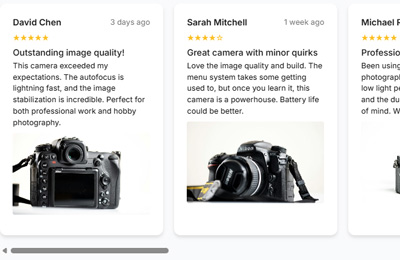
The Carousel Widget displays reviews in a dynamic, auto-rotating horizontal slider.
Grid Widget

The Grid Widget presents reviews in uniform, organized columns for easy scanning.
List Widget
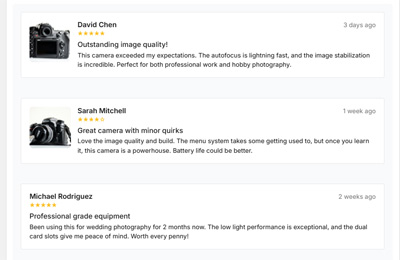
The List Widget shows reviews in a comprehensive, full-width vertical format.
Masonry Grid Widget
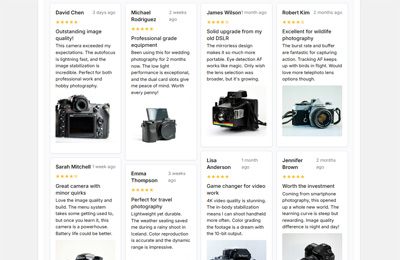
The Masonry Grid Widget creates a Pinterest-style cascading layout with variable heights.
Review Badge Widget

The Review Badge displays your aggregate rating in a compact, eye-catching format.
Widget Comparison
| Widget | Best For | Layout Style | Space Required |
|---|---|---|---|
| Carousel | Homepages, limited space | Horizontal slider | Compact |
| Grid | Product pages, research | Uniform columns | Medium |
| List | Dedicated review pages | Full-width vertical | Large |
| Masonry | Visual impact, mixed content | Cascading tiles | Medium-Large |
| Badge | Trust signals, headers | Compact indicator | Minimal |
Carousel Widget
The Carousel Widget is a dynamic, auto-rotating horizontal slider that displays customer reviews in an engaging, interactive format. Unlike static layouts, the carousel presents reviews one set at a time, creating focused attention on individual testimonials while cycling through your full range of customer feedback with smooth transitions.
Key Features:
- Automatic rotation showcases reviews without customer interaction
- Smooth transitions with multiple animation styles (Slide, Fade, Cover Flow)
- Space-efficient horizontal design
- Mobile-friendly swipe gestures
- Configurable navigation dots and arrows
Best For:
- Homepage hero sections
- High-traffic landing pages with limited vertical space
- Featured testimonials and curated review showcases
- Mobile-first experiences
For complete configuration options, see the Carousel Widget Settings Reference.
Grid Widget
The Grid Widget is a clean, structured layout that displays customer reviews in a uniform, organized grid format. This is the most traditional and expected review display pattern, offering excellent readability, easy scanning, and intuitive navigation. The grid presents reviews in equal-width columns with consistent spacing.
Key Features:
- Predictable, uniform column structure
- Configurable 2, 3, or 4 columns on desktop
- Responsive mobile optimization
- Built-in pagination for browsing large review sets
- Optional customer filtering by star rating
Best For:
- Product pages where customers actively research
- Collection pages with diverse product reviews
- Dedicated review archives
- Professional, corporate presentations
For complete configuration options, see the Grid Widget Settings Reference.
List Widget
The List Widget is a comprehensive, full-width review display designed for detailed customer engagement. Unlike compact grid or masonry layouts, the List Widget prioritizes readability and depth, making it ideal for dedicated review pages where customers want to thoroughly explore feedback.
Key Features:
- Full-width layout for maximum readability
- Expandable "Read more" functionality for long reviews
- Merchant reply display inline with reviews
- Helpful voting system for customer engagement
- Advanced filtering and sorting controls
- Multiple pagination styles (page numbers, load more, infinite scroll)
Best For:
- Dedicated reviews pages
- High-detail product pages for considered purchases
- Service-based businesses with narrative reviews
- B2B or high-value items requiring thorough social proof
For complete configuration options, see the List Widget Settings Reference.
Masonry Grid Widget
The Masonry Grid Widget creates a Pinterest-style cascading layout where review cards of varying heights flow naturally together. This dynamic approach ensures space is optimized and creates a modern, magazine-like visual experience that showcases diverse review lengths beautifully.
Key Features:
- Variable-height cards that fit content naturally
- Staggered layout creates visual interest
- Efficient use of screen real estate
- Perfect for mixed review lengths
- Supports customer-uploaded photos elegantly
Best For:
- Homepage review sections with visual impact
- Mixed review lengths (brief comments to detailed testimonials)
- Visual-heavy reviews with customer photos
- Modern, editorial theme designs
For complete configuration options, see the Masonry Grid Widget Settings Reference.
Review Badge Widget
The Review Badge is a compact, versatile widget that displays your aggregate rating summary in a prominent, eye-catching format. Unlike full review display widgets, the Badge focuses on showing key data at a glance: your average star rating, review count, and trust indicators.
Key Features:
- Four distinct styles: Floating, Inline, Compact, and Trust Badge
- Clickable to scroll users to your full review section
- Device-specific visibility controls
- Optional platform logos (Google, Facebook, Trustpilot)
- Lightweight and performance-friendly
Best For:
- Product page hero sections near pricing
- Persistent floating trust signals
- Header and navigation areas
- High-value product pages and checkout areas
For complete configuration options, see the Review Badge Widget Settings Reference.
Choosing the Right Widget
By Page Type
| Page | Recommended Widget | Why |
|---|---|---|
| Homepage | Carousel or Masonry | Dynamic visual impact, showcases variety |
| Product Page | Grid + Badge | Structured research + instant trust signal |
| Dedicated Reviews Page | List | Comprehensive exploration with filtering |
| Collection Page | Grid or Masonry | Displays multiple product reviews efficiently |
| Landing Page | Carousel + Badge | Focused testimonials with trust indicators |
By Customer Journey Stage
Browsing/Discovery Phase:
- Use Carousel or Floating Badge to catch attention passively
- Auto-rotation showcases reviews without requiring interaction
Research/Evaluation Phase:
- Use Grid or List for comprehensive review browsing
- Enable filtering and sorting for customer control
Ready to Purchase:
- Use Trust Badge near the add-to-cart button
- Show verified purchase indicators prominently
By Review Content Type
Brief Reviews (10-30 words):
- Grid or Carousel work best with uniform, short content
Mixed Length Reviews:
- Masonry handles varying lengths elegantly
Detailed Testimonials (50+ words):
- List provides full-width readability for comprehensive feedback
Photo-Heavy Reviews:
- Masonry or Grid showcase customer images beautifully
Next Steps
Ready to set up your widgets? Visit the Set Up Widgets guide to create and install your first widget configuration.
For detailed settings for each widget type, explore the individual reference guides: