ShareYourOpinion Review Collection: How It Works
Overview
Review Multiplier collects customer reviews through a trusted, independent platform called ShareYourOpinion (shareyouropinion.co). This guide explains why we use a separate website for review collection, how the process works, and how you can customize it to match your brand.
Why a separate website? Collecting reviews on an independent platform, separate from your store, maximizes customer trust and response rates. Customers feel more confident that their honest feedback will be heard when it's not submitted directly on the merchant's website.
The Review Submission Experience
Once a customer clicks the review link in their email, they're taken to a branded page on shareyouropinion.co that matches your store's look and feel.
Page Branding
The review collection page includes:
- Your store logo at the top
- Your brand colors throughout the interface
- Store name prominently displayed
- Secure badge (🔒 Secure) for customer confidence
- Mobile-optimized layout for easy submission
Two Collection Methods: 1-Step vs 2-Step
You can choose between two review collection approaches depending on your business needs:
1-Step Collection: Store Review Only
With 1-step collection, customers are asked for one overall review about their shopping experience.
What Customers See:
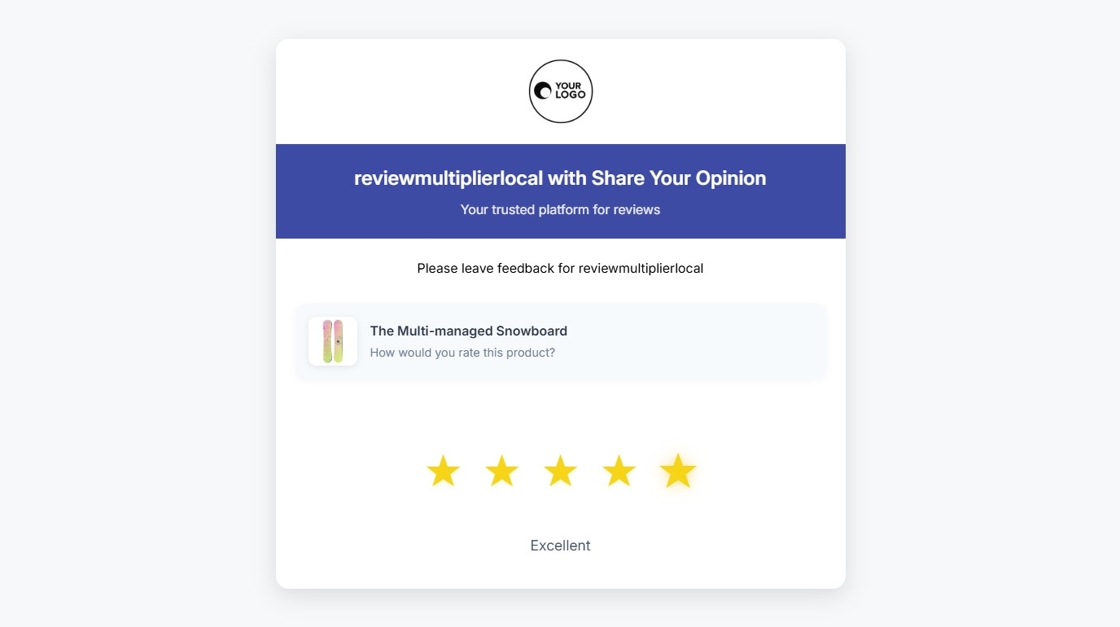
The review collection page shows the store logo, branding, and a simple form for customers to rate and review their overall experience.
What Gets Collected:
- One overall star rating (1-5 stars)
- One comprehensive review (minimum 50 characters)
- Customer's name
- Order details (automatically linked)
Best For:
- Simplicity and higher completion rates
- Service-based businesses
- Single-product stores
- When using Shopify Shop for product reviews
- Starting out with review collection
2-Step Collection: Product + Store Reviews
With 2-step collection, customers provide separate feedback about the product and their overall experience.
Step 1: Product Review
First, customers review the specific product they purchased with star rating and written feedback.
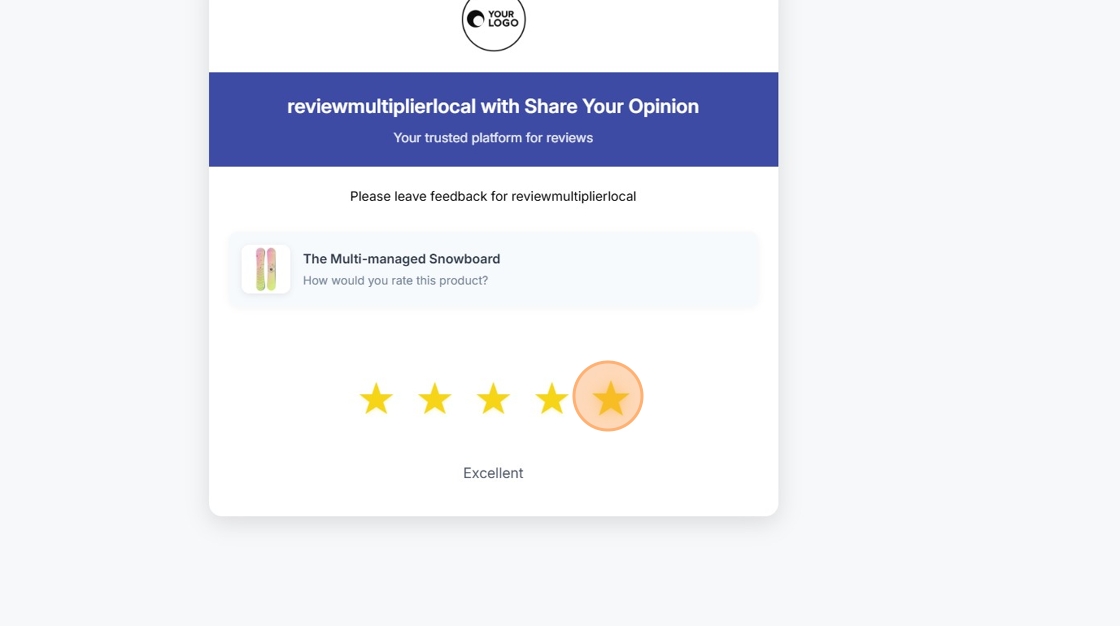
Customers select their star rating for the product.
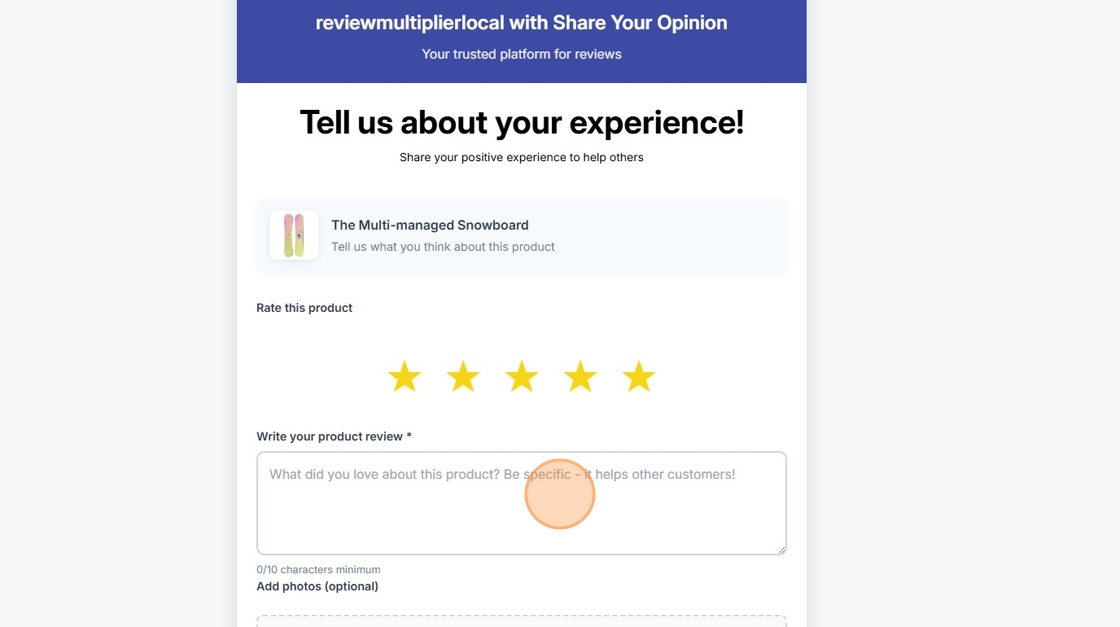
After rating, customers write their detailed product review.
Step 2: Store Review (appears after Continue is clicked)
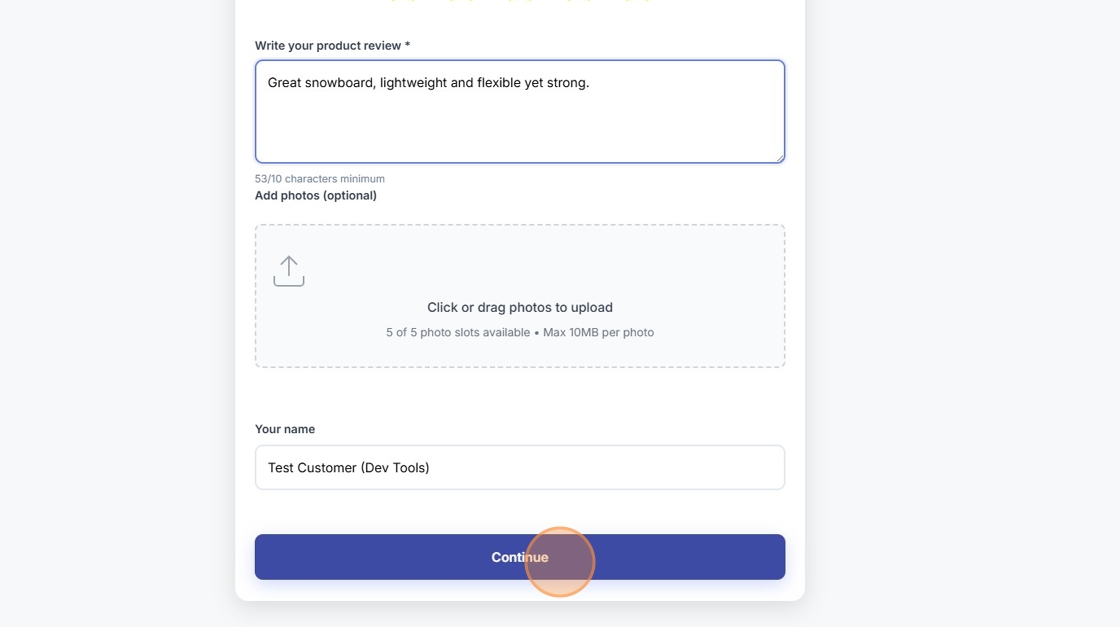
After completing the product review, the page dynamically refreshes to collect the store review.
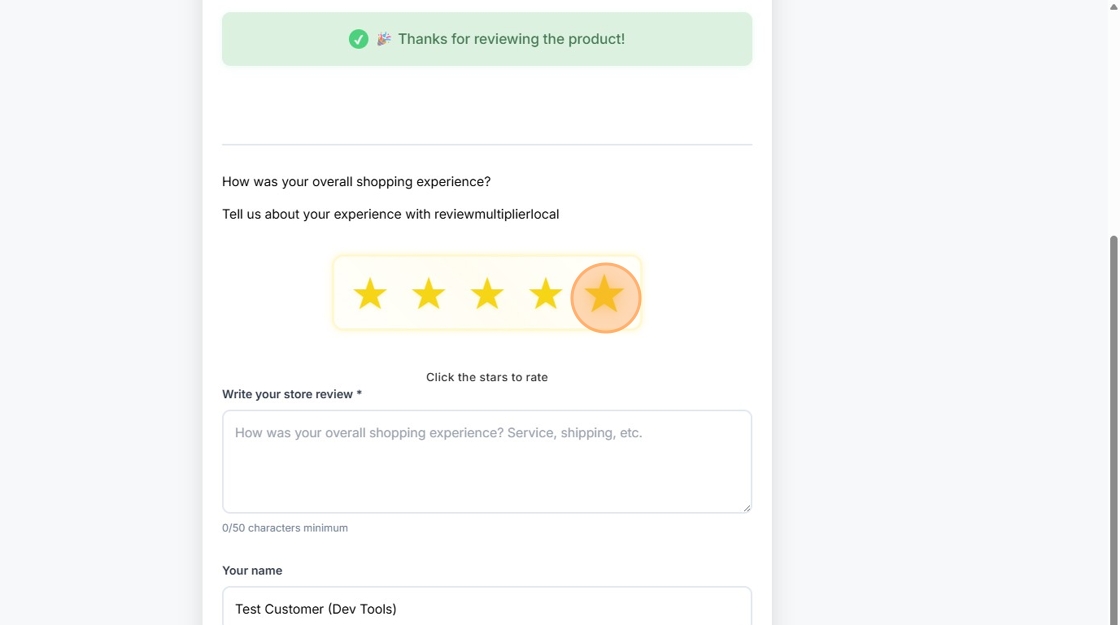
Customers rate their overall shopping experience with the store.
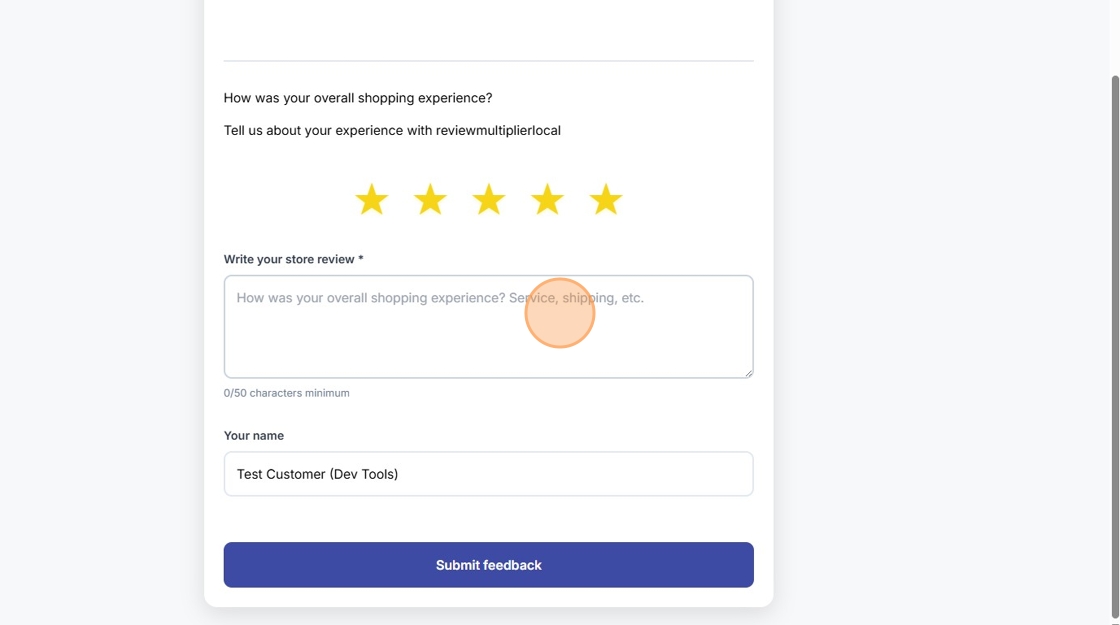
Customers provide their detailed store review.
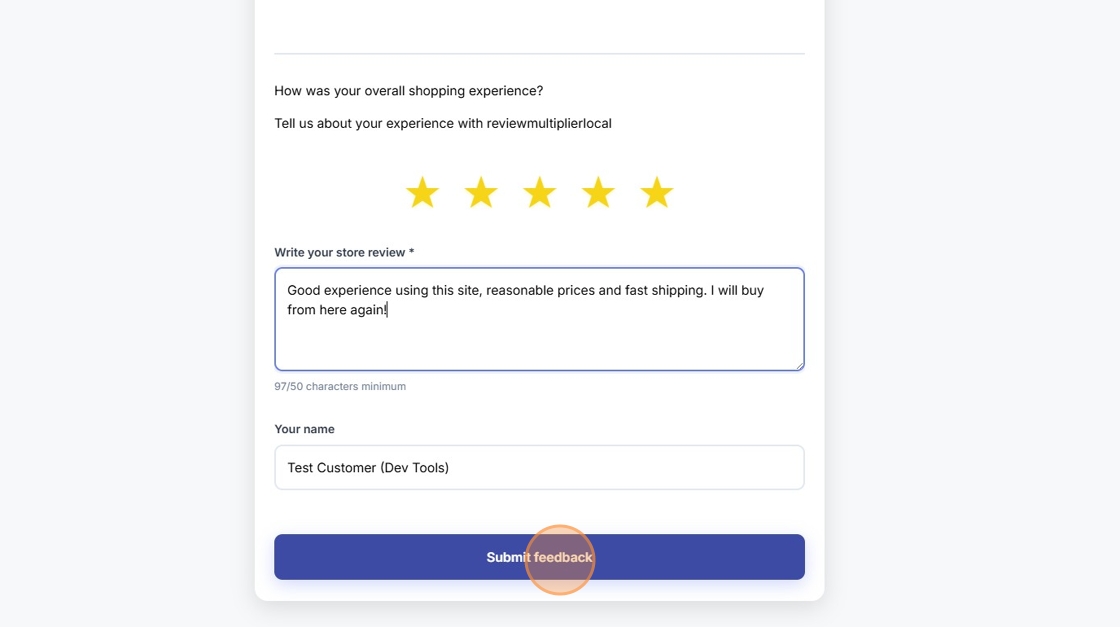
Finally, customers click the "Submit feedback" button to complete their review.
What Gets Collected:
- Product rating (1-5 stars)
- Product review text (minimum 10 characters)
- Optional product photos (up to 5 images)
- Store rating (1-5 stars)
- Store review text (minimum 50 characters)
- Customer's name
- Order details (automatically linked)
Best For:
- Running Google Shopping ads (requires product reviews)
- Multi-product catalogs
- When product-specific feedback is valuable
- Building detailed customer insights
- Not using Shopify Shop or properly coordinated with Shop
Choosing Between 1-Step and 2-Step
| Factor | 1-Step (Store Only) | 2-Step (Product + Store) |
|---|---|---|
| Customer Time | 1-2 minutes | 2-3 minutes |
| Completion Rate | Higher (simpler) | Lower (more steps) |
| Google Shopping | ❌ Not eligible | ✅ Required for star ratings |
| Product Photos | Less common | More common (10-20%) |
| Best For | Simplicity, volume | Detail, Google ads |
You can change this setting anytime in Review Collection → Review Collection Page tab.
For detailed guidance on which option to choose, see:
The Review Multiplication Page
After customers submit their review, they're redirected to the Review Multiplication page (shareyouropinion.co/share/[review-id]) where they can share their feedback across multiple review platforms.
How It Works
📋 Free: 10/month | Starter: 50/month | Pro: Unlimited
1. Thank You Message & Platform Sharing Interface
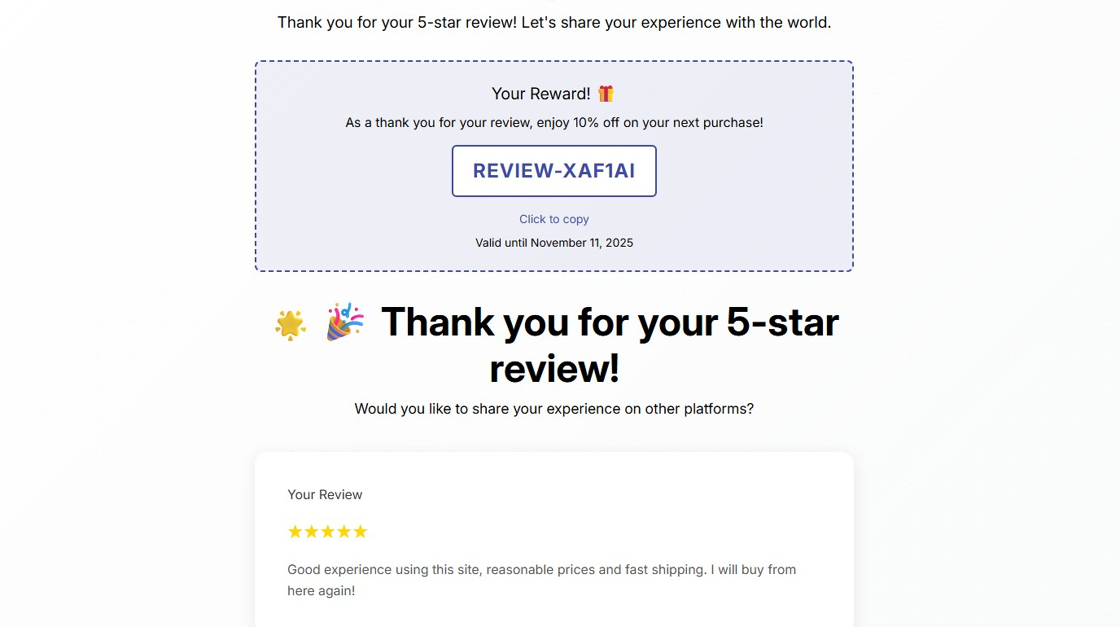
After submitting their review, customers see the multiplication page asking "Would you like to share your experience on other platforms?" with all configured review platforms listed.
2. AI-Rewritten Review Versions
For each review platform you've configured, Review Multiplier automatically generates a unique, platform-optimized version of the customer's review using AI.
Why unique versions?
- Most review platforms prohibit duplicate content
- Each platform has different content policies and requirements
- AI rewrites maintain the customer's sentiment while varying the wording
- Helps customers comply with platform guidelines
Example:
If you've configured Google, Trustpilot, and Yelp, customers see each platform with:
- Platform name and logo
- AI-generated unique review version
- Word count indicator
- One-click copy and open buttons
- Completion status (Pending → Completed)
3. One-Click Sharing
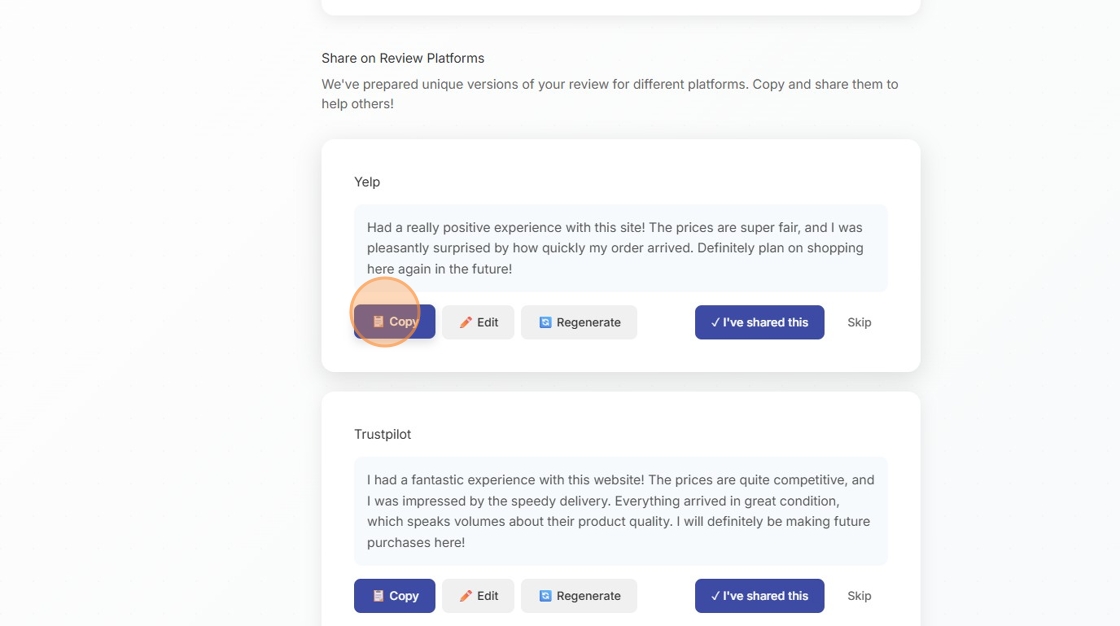
Customers click the "📋 Copy" button to copy the unique review version to their clipboard.
For each platform, customers can:
- Read the AI-generated unique version
- Click "📋 Copy" button
- The review text is copied to their clipboard
- Platform's review page opens in a new tab
- Customer pastes and submits (takes ~30 seconds)
4. Completion Tracking
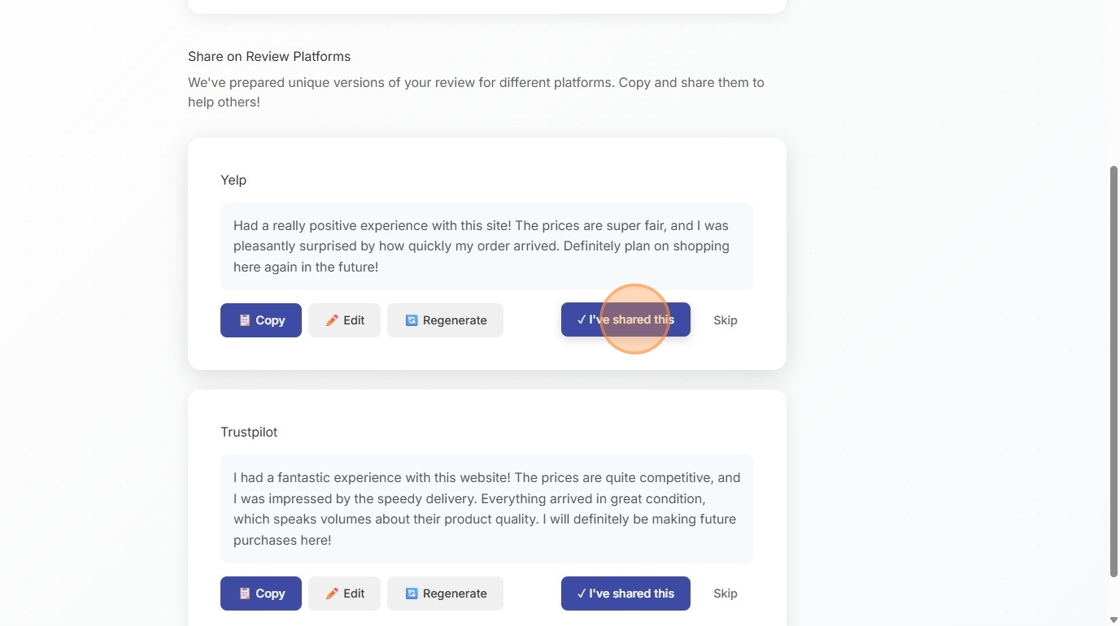
After sharing to a platform, customers click "✓ I've shared this" to mark it as complete.
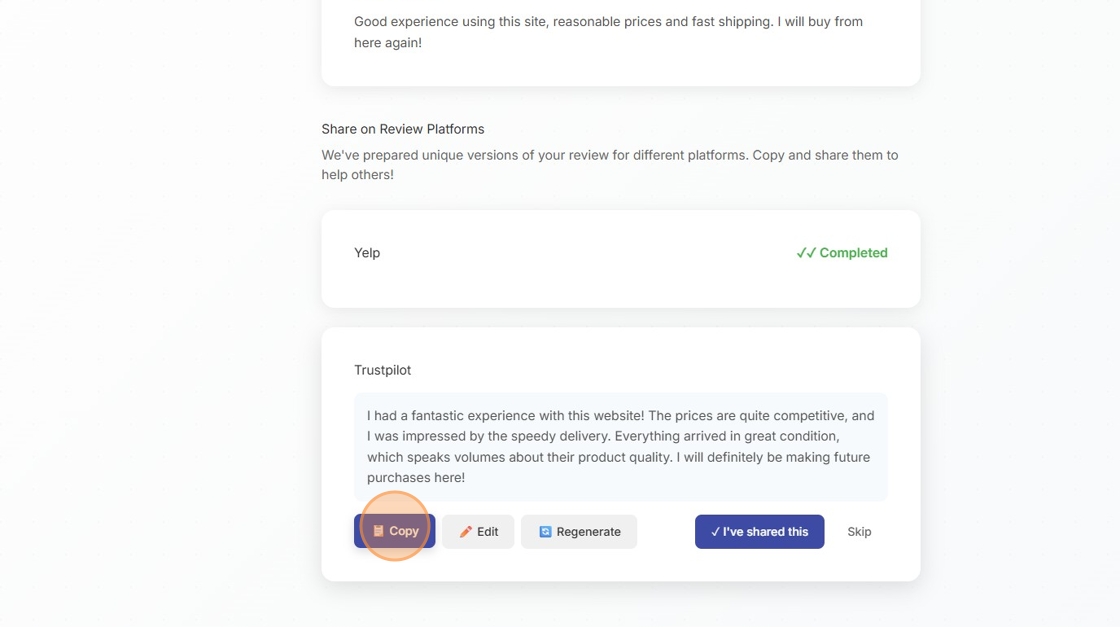
Customers can continue sharing to additional platforms, each with its unique AI-generated version.
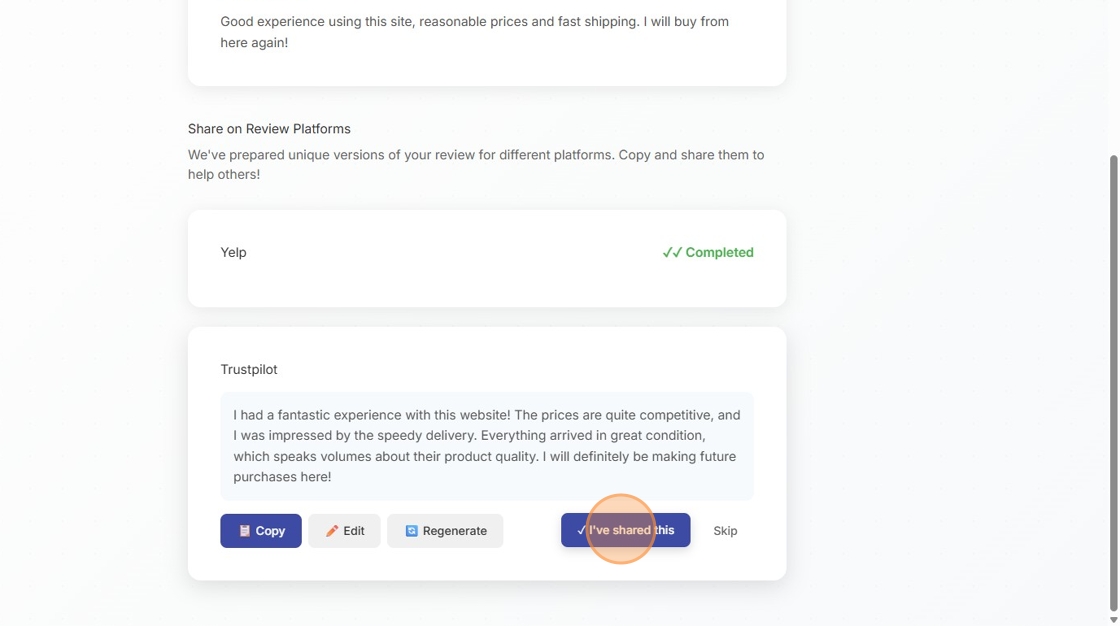
Each platform can be marked as complete individually.
- ✓ Checkmark appears when customer completes each platform
- Progress is saved automatically
- Customers can return later to complete remaining platforms
- You see multiplication success rate in your dashboard
5. Reward Delivery (if enabled)
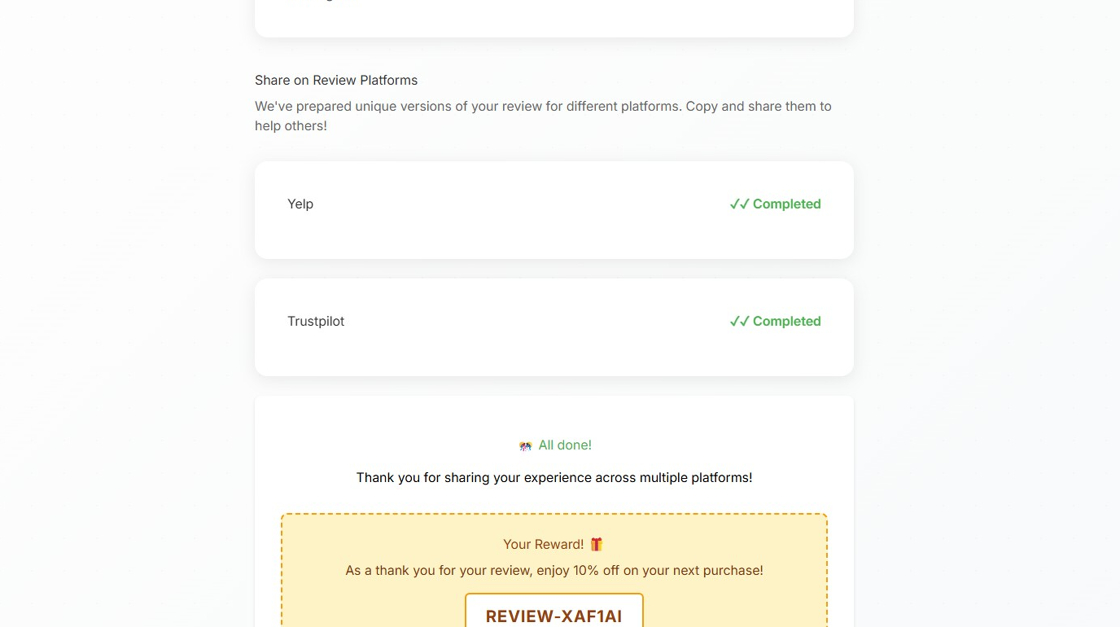
After sharing to their first platform, customers receive their reward coupon code which they can copy and use on their next purchase.
After sharing to their first platform, customers receive:
- Thank you message
- Coupon code displayed prominently
- Copy button for easy use
- Expiration information
- Terms and conditions
Which Platforms Appear on the Sharing Page?
Important: Only platforms that you've fully configured in Review Multiplier will appear on the customer's sharing page.
Platform Configuration Requirements
To appear on the sharing page, each platform must:
-
Be configured in Review Multiplier
- Navigate to Connections → Publish Settings tab
- Click on the platform (e.g., "Google Reviews")
- Complete all required fields
-
Have an active profile
- Platform toggle must be enabled (ON)
- Required information must be filled out
- Test connection should pass (if applicable)
-
Be positioned in your desired order
- Platforms appear in the order you arrange them
- Drag and drop in Connections → Publish Settings
- Most important platforms should be first
Supported Review Platforms
The following platforms can be configured for multiplication:
| Platform | What's Required | Widget Support |
|---|---|---|
| Google Reviews | Business listing URL | No |
| Trustpilot | Review page URL + Widget code | Yes |
| Yelp | Business URL + Widget code | Yes |
| Facebook Recommendations | Facebook page URL | No |
| Better Business Bureau | BBB profile link | Yes |
| Reviews.io | Store slug | Yes |
| SiteJabber | Domain name | Yes |
| ResellerRatings | Store name | Yes |
| ProductReview.com.au | Write review link | Yes |
| Feefo | Brand name | Yes |
Example Scenario:
If you've configured profiles for:
- ✓ Google Reviews (complete)
- ✓ Trustpilot (complete)
- ❌ Yelp (not configured)
- ✓ Facebook (complete)
Your customers will see only Google, Trustpilot, and Facebook on their sharing page - Yelp won't appear until you complete its configuration.
Customizing Your Review Collection
You have extensive control over how your review collection looks and functions. All customization is done in the Review Collection section of Review Multiplier.
Available Customization Options
1. Branding Settings (Review Collection → Branding tab)
Visual Customization:
- Store Logo: Upload your logo (appears on all shareyouropinion.co pages)
- Primary Color: Your main brand color (buttons, links)
- Secondary Color: Accent color (ratings, highlights)
- Font Family: Choose from web-safe fonts or upload custom fonts
Preview:
- Real-time preview on the right side shows exactly how it looks
- Preview updates instantly as you make changes
- Test on mobile and desktop views
2. Email Settings (Review Collection → Email Settings tab)
📋 Free: plain text | Starter: HTML/plain/multipart | Pro: HTML/plain/multipart
Email Templates:
Choose between two email types:
- Initial Review Request: First email after order fulfillment
- Reminder Email: Follow-up if customer hasn't responded
Customizable Elements:
For 1-Step (Store Only) Mode:
- Subject line
- Email heading
- Body text (HTML or Plain Text)
- Button text ("Share Your Feedback")
- Button colors
- Footer text
- Store logo placement
For 2-Step (Product + Store) Mode:
- All the above, plus:
- Product-specific subject line
- Product image display options
- Product name placement
Email Format Options:
- HTML: Rich formatting with colors and images
- Plain Text: Simple text-only emails (better deliverability)
- Multipart: Sends both formats (customer's email client chooses)
Template Variables:
Use these dynamic variables in your emails:
\{{customer_name\}}- Customer's first name\{{product_name\}}- Name of product purchased\{{store_name\}}- Your store name\{{order_number\}}- Order reference number
3. Review Collection Page Settings (Review Collection → Review Collection Page tab)
Collection Method:
- Toggle between 1-step and 2-step collection
- Change takes effect immediately for new review requests
Page Text Customization:
- Page heading
- Instructions for customers
- Star rating labels
- Text field placeholders
- Submit button text
- Thank you message after submission
Form Behavior:
- Minimum review length (characters)
- Photo upload enabled/disabled
- Required vs optional fields
- Auto-save progress
Privacy & Legal:
- Display privacy policy link
- Terms of service link
- GDPR compliance notices
- Data usage disclosure
4. Coupon Codes (Review Collection → Coupons tab)
Coupon Configuration:
- Enable/disable coupon rewards
- Coupon code prefix (e.g., "REVIEW-")
- Discount type (percentage or fixed amount)
- Discount value
- Expiration period (days)
- Usage limits
Display Options:
- Show coupon on sharing page (after first platform share)
- Show coupon on thank you page (immediately after review)
- Email coupon code separately
- Highlight coupon with banner
Automatic Code Generation:
- Codes are created automatically in your Shopify admin
- Unique code for each review
- Tracked to review submission
- Analytics on coupon usage
Privacy and Security
Why Customers Trust ShareYourOpinion
Independent Platform Benefits:
- Neutral Ground: Not controlled by the merchant
- Unbiased: Customers feel reviews won't be suppressed
- Transparent: Clear that feedback goes to an independent system
- Secure: SSL encryption for all submissions
- Privacy-Focused: Data handled according to privacy policy
What We Display:
- 🔒 Secure badge on every page
- Privacy policy link in footer
- Terms of service link
- GDPR compliance notices (where applicable)
- Data handling transparency statement
Review Moderation
🔒 Starter or Pro plan required
All reviews are moderated according to your settings:
Auto-Publish (Default):
- 4-5 star reviews: Published immediately
- 1-3 star reviews: Held for moderation (you decide)
- Auto-publish after 14 days if not moderated (transparency guarantee)
Manual Moderation:
- Access pending reviews in Review Multiplier dashboard
- Approve, hide (with reason), or delete (imported only)
- Required rejection reasons from fixed list
- All moderation actions logged in activity feed
Review Display:
- Published reviews appear on your website widgets
- Published reviews appear in Google Merchant Feed (if 4+ stars)
- Published reviews can be shared to platforms (if high rating)
- Hidden reviews remain in system but not displayed
Frequently Asked Questions
Why do you use shareyouropinion.co instead of my store domain?
Trust and Response Rates: Research shows customers are more likely to leave honest feedback on an independent platform. When reviews are collected on the merchant's own website, customers may worry about bias or suppression of negative feedback.
Platform Compliance: Review platforms like Google, Trustpilot, and Yelp have strict policies about where reviews are collected. Using a neutral, independent domain helps maintain compliance.
Technical Benefits: Hosting the review form on a separate domain allows us to optimize the experience without being constrained by your store's theme, plugins, or page load speeds.
Can I use my own domain instead of shareyouropinion.co?
Yes! You can configure a custom domain like "reviews.yourstore.com" if you prefer. This requires:
- DNS configuration (we provide instructions)
- SSL certificate setup (handled automatically)
- Domain verification
- 24-48 hours for propagation
Contact support to set up a custom domain.
What happens to negative reviews?
Transparency First: All reviews, including negative ones, are collected and stored in your Review Multiplier dashboard.
Display Control: You can choose how to handle different star ratings:
- High ratings (4-5 stars): Auto-publish immediately
- Medium ratings (3 stars): Hold for review, auto-publish after 14 days
- Low ratings (1-2 stars): Hold for review, auto-publish after 14 days
Cannot be suppressed: Even if you hide a review (with valid reason), it auto-publishes after 14 days. This ensures transparency and complies with review platform policies.
Private Feedback: Customers always have the option to leave private feedback that's not published but helps you improve.
How do customers know it's legitimate?
Trust Signals on Review Pages:
- Your Store Branding: Logo, colors, and name prominently displayed
- Secure Badge: 🔒 indicator in the header
- Order Details: Shows their actual order information (proves it's not spam)
- Professional Design: Clean, modern interface builds confidence
- Clear Purpose: Transparent about what happens with their feedback
Email Trust Signals:
- Personalized: Uses customer's name and order details
- Consistent Branding: Matches your store's look
- Clear Sender: From shareyouropinion.co (not a suspicious domain)
- Expected Timing: Sent at logical time after purchase
How long does the review process take?
For Customers:
- 1-Step Collection: 1-2 minutes (one form, one submission)
- 2-Step Collection: 2-3 minutes (two forms, more detail)
- Platform Multiplication: 30 seconds per platform (copy and paste)
- Total Time: 3-5 minutes to complete everything
Can customers return later to finish?
Yes The shareyouropinion.co link in the email remains active indefinitely (or until you pause review invitations).
Progress Saving:
- If customer starts but doesn't finish, they can return to the same link
- Draft progress may be saved (depending on browser)
- Sharing page completion is tracked (✓ checkmarks persist)
Follow-Up Emails:
- You can send reminder emails to customers who haven't responded
- Reminder emails include the same link
- Configurable timing (e.g., 7 days after first email)
What's the difference between product and store reviews?
Product Reviews:
- Specific to the item purchased
- Focus on quality, features, fit, performance
- Include optional product photos
- Required for Google Shopping star ratings
- Minimum 10 characters
Store Reviews:
- Overall shopping experience
- Cover shipping, service, website, packaging
- Great for homepage testimonials
- Work for any business type
- Minimum 50 characters
When to use each: See our comprehensive guide Product vs Store Reviews: Choosing Your Strategy for detailed recommendations based on your business type and goals.
How is AI multiplication different from customers copying their own review?
AI Multiplication Advantages:
- Unique Content: Each version is rewritten to be sufficiently different
- Platform Compliance: Avoids duplicate content violations
- Optimized Length: Matches each platform's ideal review length
- Natural Language: Maintains customer's voice while varying structure
- Keyword Integration: Can emphasize platform-specific keywords
- Tone Adjustment: Can be more professional or casual per platform
Customer Control:
- Customers see each version before sharing
- Can regenerate if they don't like the AI version
- Can edit before pasting to platform
- Can skip platforms they don't want to use
Compliance Note: AI rewrites don't change the core sentiment or facts - they just vary the wording to comply with platform policies against duplicate content.
What happens if I change my store name or domain?
If you update your store name or custom domain in Shopify Admin > Settings, Review Multiplier will automatically pick up the changes the next time you open the app dashboard. Your updated store name and domain will then appear in all future review request emails, review collection pages, and "Return to store" links.
You do not need to reinstall the app or change any settings within Review Multiplier — just make the change in Shopify and open the Review Multiplier dashboard to sync it.
Related Resources
Getting Started
- Setting Up Review Collection - Initial configuration guide
- Branding Your Review Pages - Visual customization walkthrough
- Email Template Best Practices - Writing effective review requests
Strategy Guides
- Product vs Store Reviews: Choosing Your Strategy - Detailed comparison
- Shop vs Google Shopping: Coordination Guide - Avoid duplicate requests
- Optimizing Review Response Rates - Increase completion rates
Platform Configuration
- Google Reviews Setup - Configuring Google Business Profile
- Trustpilot Integration - Complete setup guide
- Configuring All Review Platforms - Platform-by-platform instructions
Technical
- Custom Domain Setup - Using your own domain for reviews
- Webhook Integration - Syncing reviews to other systems
- Review API Documentation - Programmatic access
Need Help?
Support Resources:
- Email: support@reviewmultiplier.ai
- Live Chat: Available in the Review Multiplier app
- Help Center: help.reviewmultiplier.ai
- Video Tutorials: Step-by-step guides for common tasks
Schedule a Setup Call: We offer free 15-minute setup calls to help you:
- Configure your review collection strategy
- Set up branding and email templates
- Connect your review platforms
- Test the customer experience
Last Updated: October 2025 Applies to: Review Multiplier v2.0+
Building trust through transparent, independent review collection that benefits both merchants and customers.
Viewing Recorded Review Modals
This section shows how to view the recreated screens that your customers saw when leaving their reviews.
This guide was created using Scribe.
Viewing Product Reviews
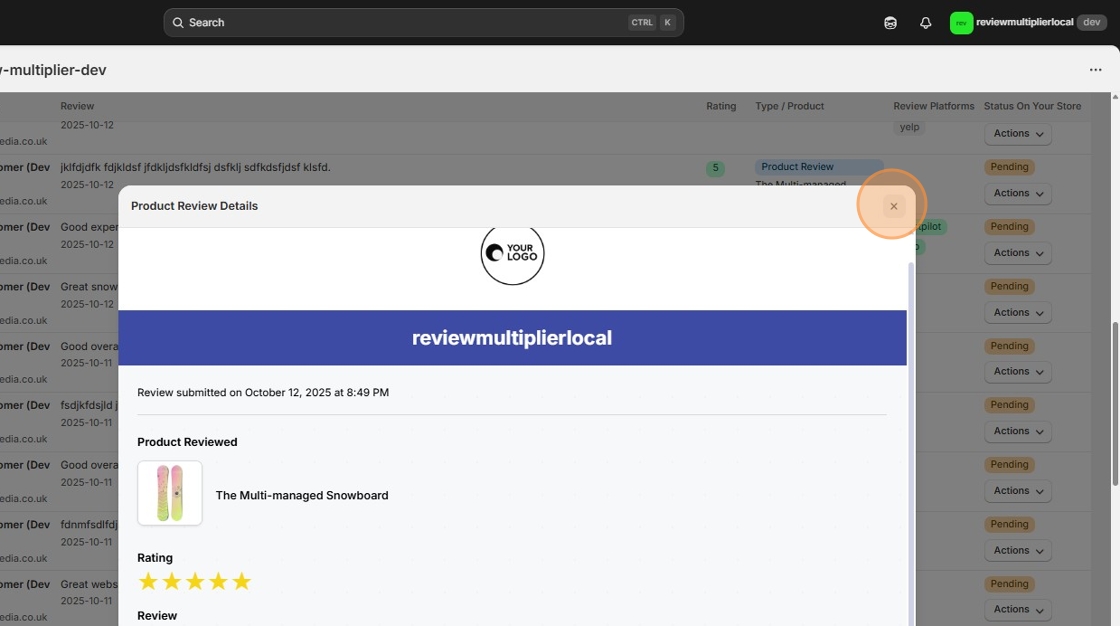
Step 1: Click a product review to see a recreation of the screen your customer saw when leaving the review.
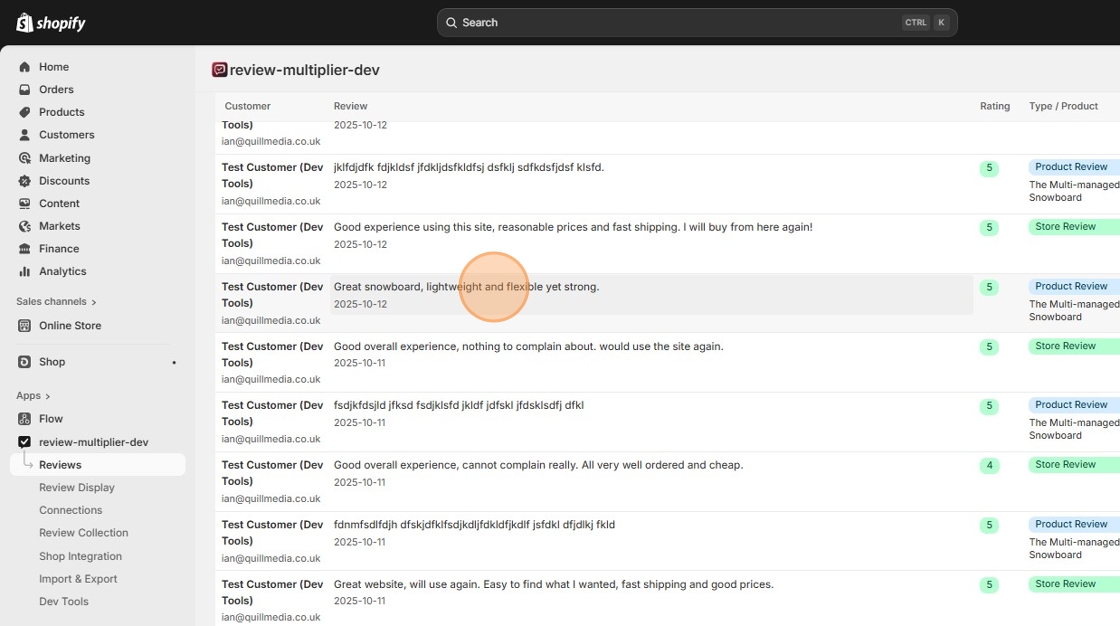
Step 2: The pop-up shows the recreated screen the customer would have seen, with extra details such as the date and time they left the review.
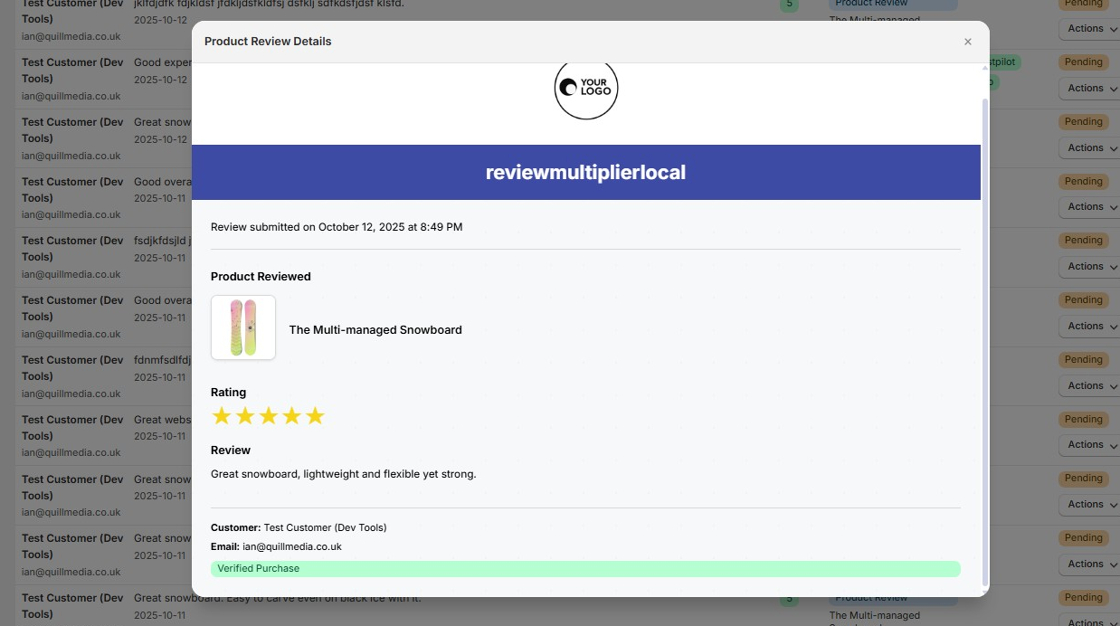
Step 3: Close the pop-up window.
Viewing Store Reviews
Step 4: Now review a whole store review. Click on a store review record.
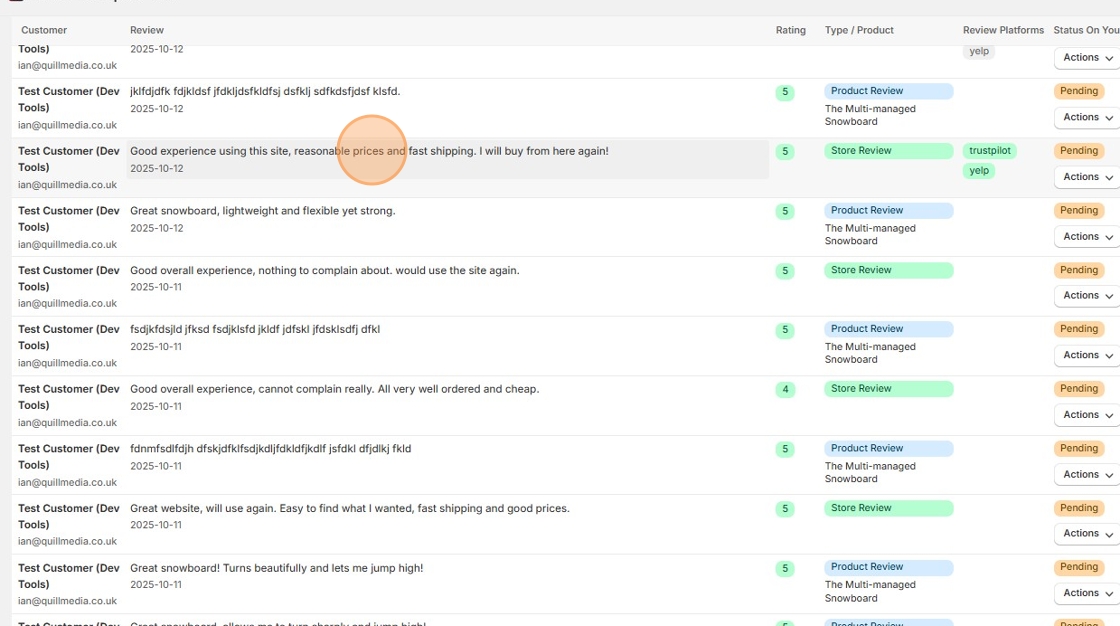
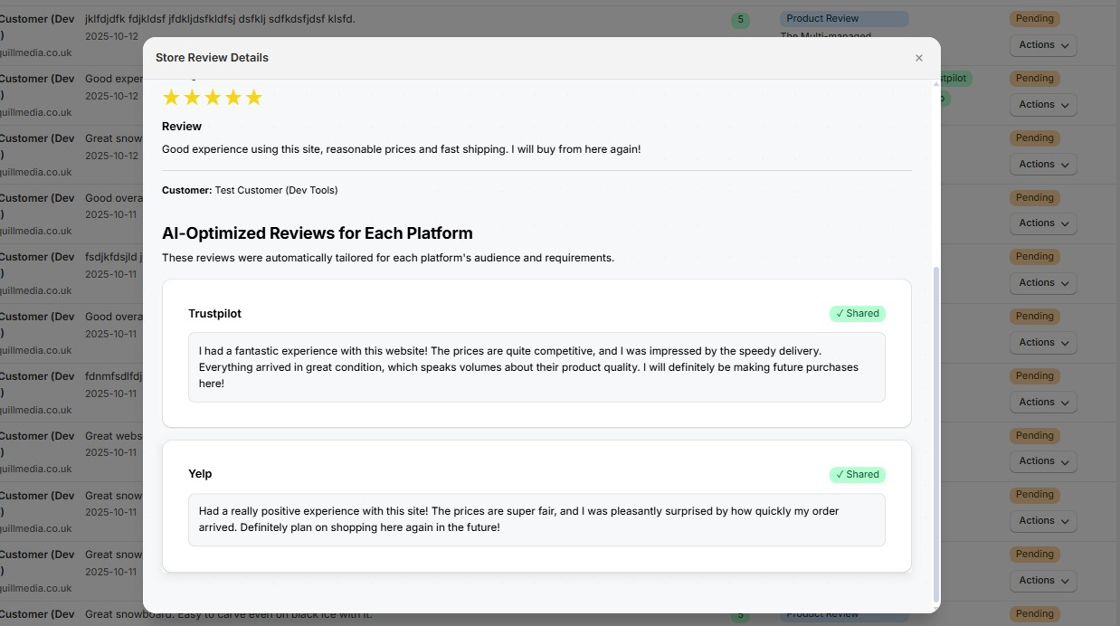
Step 5: You can see the review texts which were rewritten by artificial intelligence for each review platform. Beside each review will be a tooltip stating either "Pending" (which means the customer was shown the AI-written review text but did not necessarily share it on the relevant review platform) or "Shared" (which means the customer did click a button on the review sharing page to state that they had manually pasted the review text into the review platform website in a new browser tab).
To stick to the review platforms' terms of service, Review Multiplier cannot automatically post to review platform websites itself, we must rely on the customer to manually paste the review text there and submit the review. Similarly, we cannot know for sure whether the review was published on the review platform, so we recommend you manually check the status of your company profile at each targeted review platform periodically, to see how many reviews were published.