Review Moderation Reference Guide
With Review Multiplier's moderation system, you have the tools to manage reviews effectively while following fair practices that protect both your business and your customers' right to honest feedback.
Review Statuses Explained
Published ✅
What it means: The review is live on your store and visible to customers.
How reviews get here:
- Rating met your auto-publish threshold
- You manually published a pending review
- Review auto-published after 14 days
What you can do: Respond to the review, but you cannot unpublish it (you can hide it if there's a valid reason).
Pending ⏳
What it means: The review is waiting for your decision.
How reviews get here:
- Rating is below your threshold (e.g., 3 stars when threshold is 4)
- You haven't yet taken action on it
What you can do:
- Publish it now
- Hide it with a valid reason
- Wait for it to auto-publish (countdown shown in the app)
Time limit: You have up to 14 days from when the review was submitted.
Hidden 🚫
What it means: The review is in your database but not visible to customers.
How reviews get here:
- You manually hid it with a valid reason
What you can do:
- View the review and your reason for hiding it
- The review stays hidden as long as the reason remains valid
- Keep a record for compliance purposes
Important: Hidden reviews are retained for audit purposes but don't affect your displayed rating or review count.
Setting Up Your Moderation Preferences
Configuring Your Rating Threshold
The rating threshold determines which reviews need your approval before publishing.
Where to find it: Review Multiplier App → Reviews → Moderation Settings button
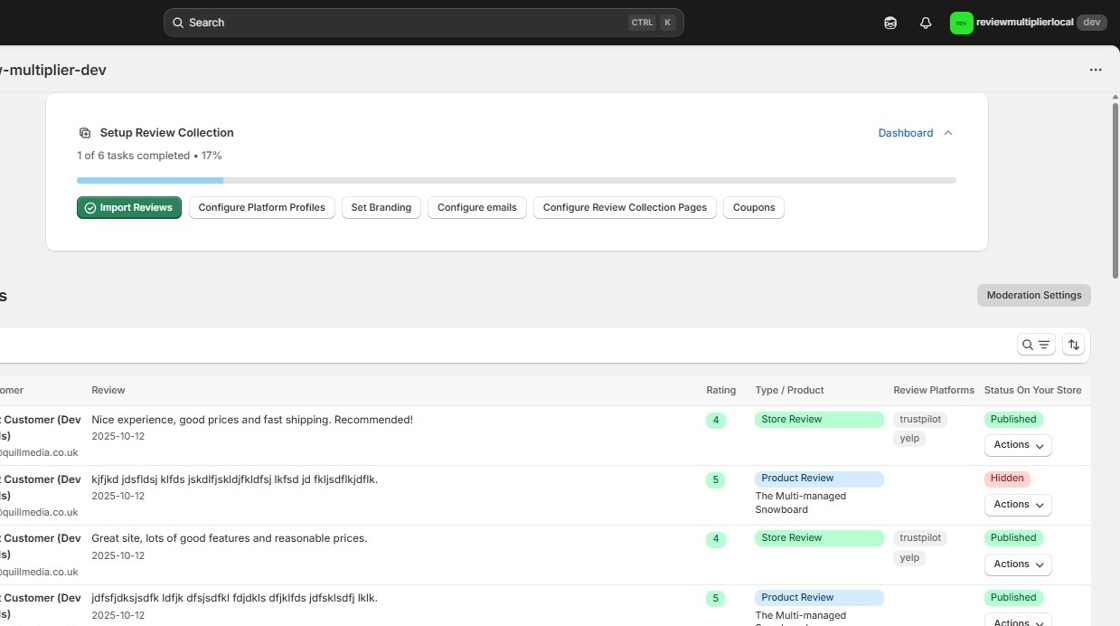
How it works:
- Set a minimum star rating (1-5 stars) using the slider
- Reviews at or above this rating publish automatically
- Reviews below this rating go to "Pending" for your review
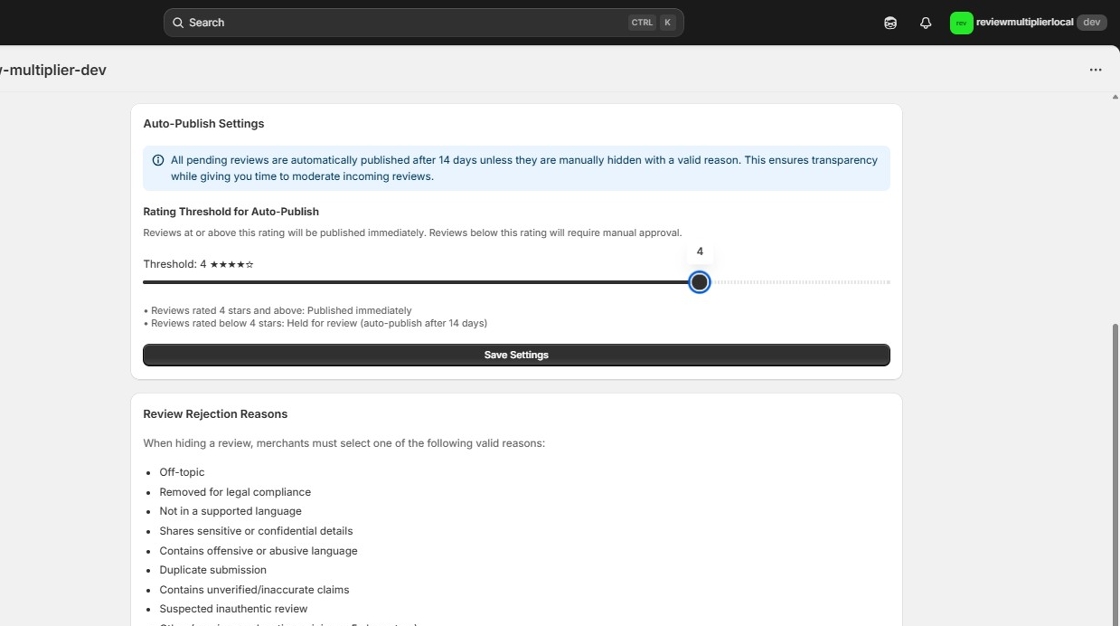
After adjusting the threshold, click Save Settings:
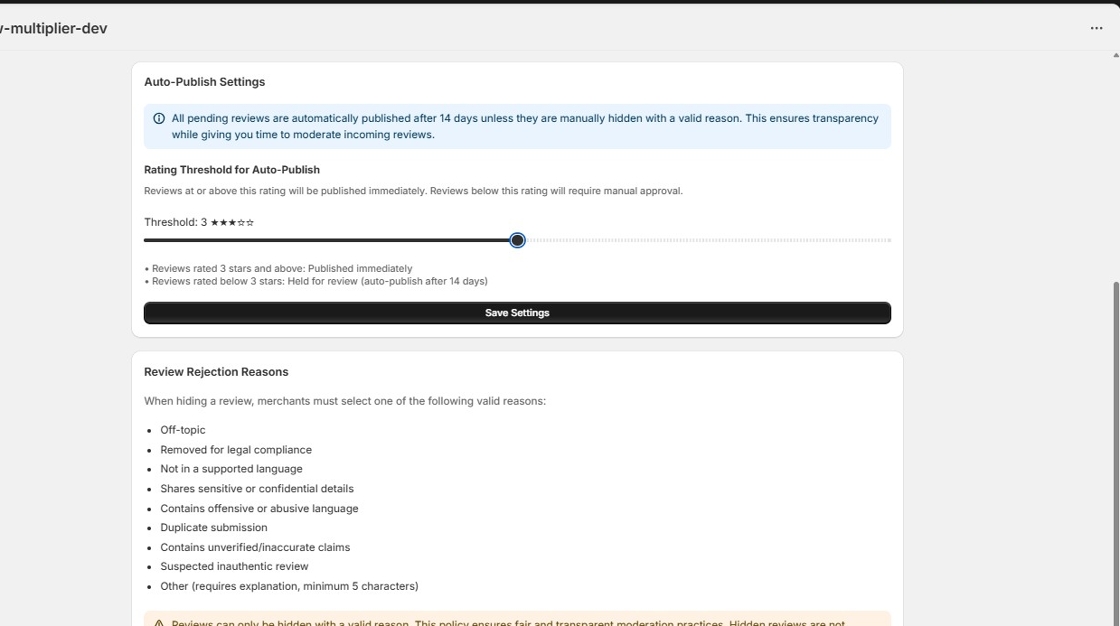
Common threshold settings:
| Threshold | What It Means | Best For |
|---|---|---|
| 5 stars | Only perfect reviews auto-publish | Very cautious approach, high-end brands |
| 4 stars | Positive reviews (4-5 stars) auto-publish | Most businesses (recommended) |
| 3 stars | Neutral and above auto-publish | Established brands with good products |
| 2 stars | Only very negative reviews held | Transparent approach, confident merchants |
| 1 star | All reviews auto-publish immediately | Maximum transparency (use with caution) |
Our recommendation: Start with 4 stars. This allows positive reviews to publish automatically while giving you a chance to review and respond to more critical feedback before it goes live.
Understanding the Statistics
Your moderation dashboard shows:
- Pending reviews: Awaiting your action (with days remaining)
- Published reviews: Live on your store
- Hidden reviews: Reviews you've chosen not to display
Taking Action on Reviews
How to Publish a Review
🔒 Pro plan required
When to use: You've reviewed a pending review and want to make it live.
Steps:
- Go to Reviews in the app
- Find the pending review
- Click Actions dropdown
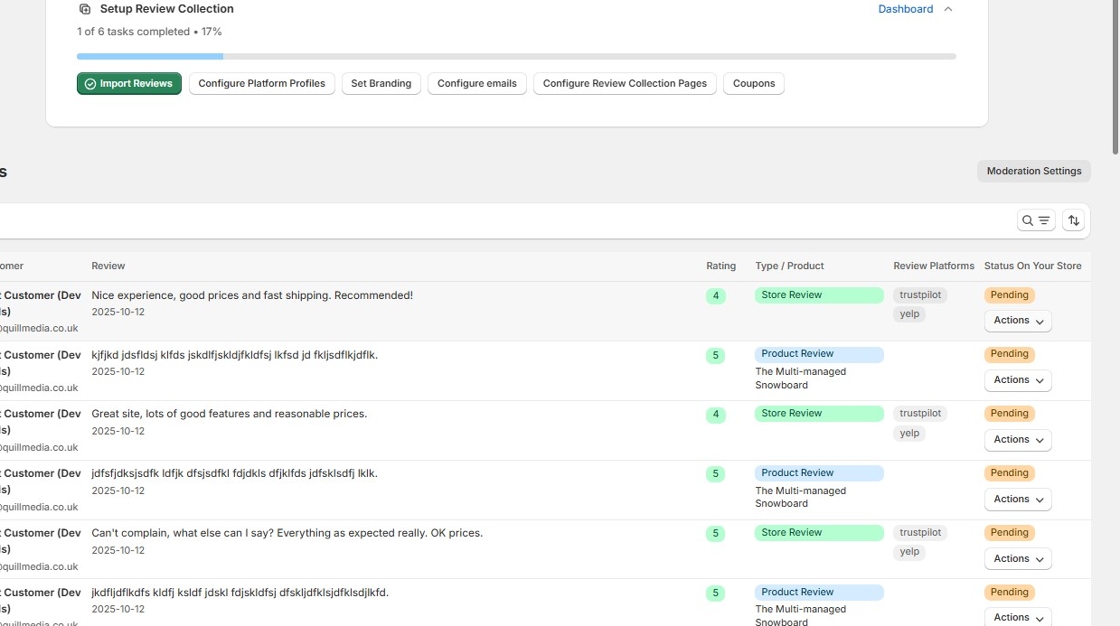
- Select Publish Review
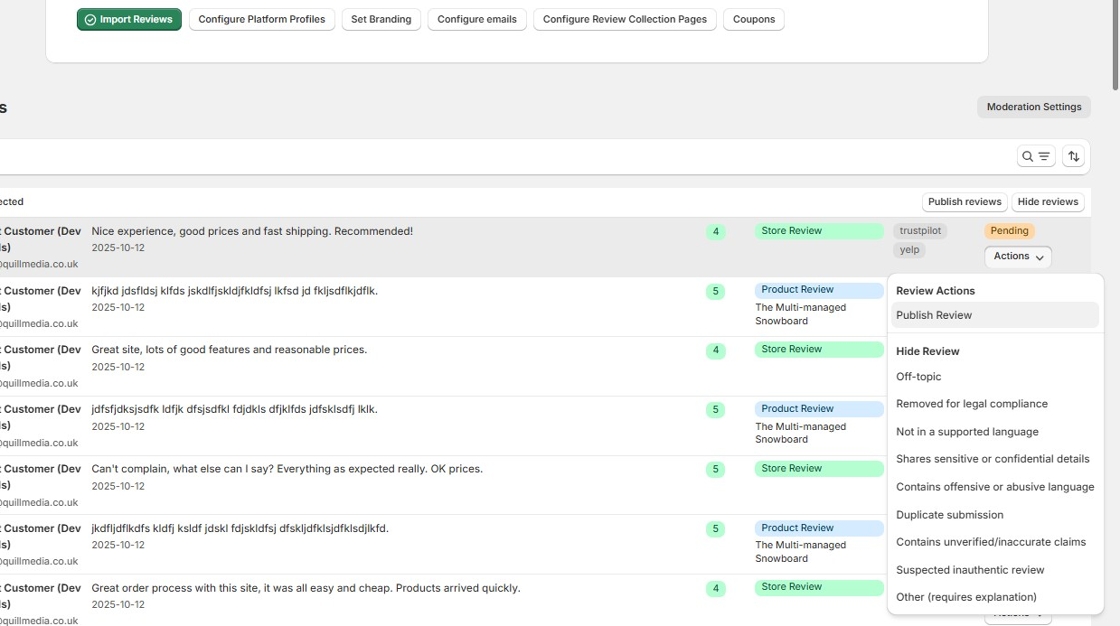
- Review goes live immediately
What happens:
- Review appears on your store
- Included in your average rating
- Customers can see it right away
- You can respond to it like any published review
How to Publish Multiple Reviews at Once (Bulk Action)
When to use: You have several pending reviews you want to publish together.
Steps:
- Go to Reviews in the app
- Check the boxes next to each review you want to publish
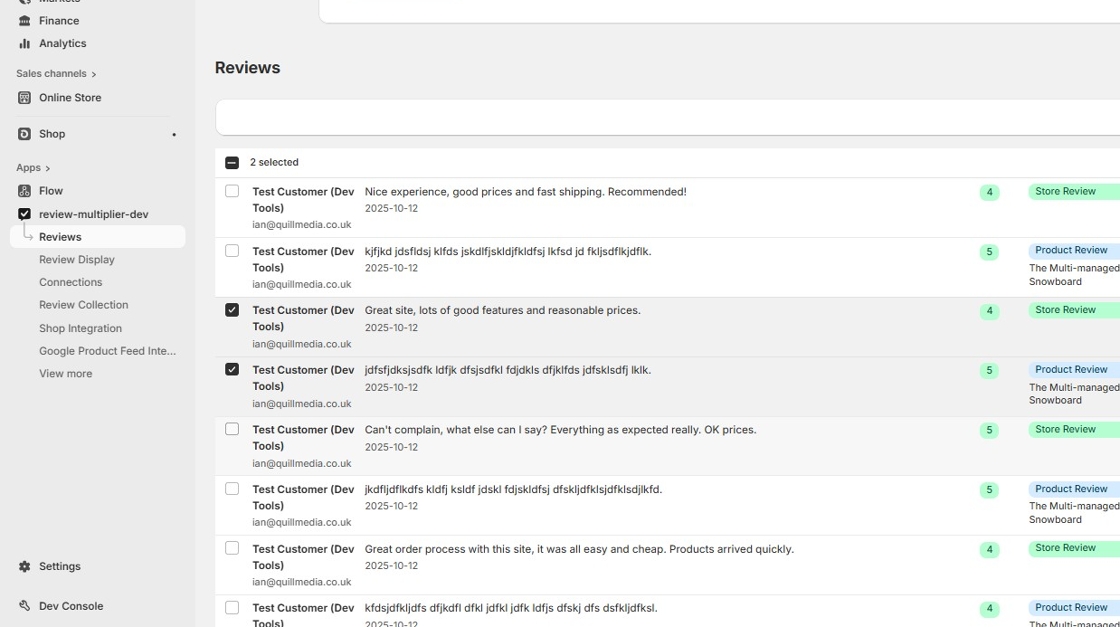
- Click Publish Selected button that appears at the top
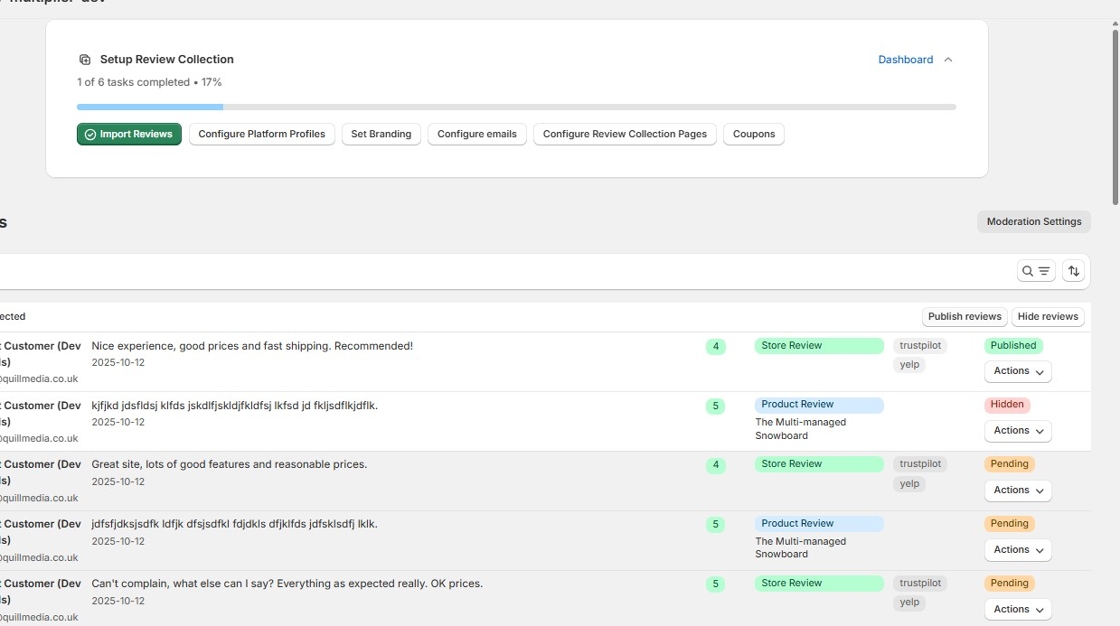
- Confirm the action
- All selected reviews go live immediately
What happens:
- All selected reviews appear on your store at once
- Each is included in your average rating
- Saves time when you have multiple reviews to approve
- Activity feed logs the bulk action
Pro tip: Use filters to show only pending reviews, making it easier to review and select multiple at once.
How to Hide a Review
When to use: A review violates policies or guidelines and shouldn't be displayed.
Steps:
- Go to Reviews in the app
- Find the review you need to hide
- Click Actions dropdown
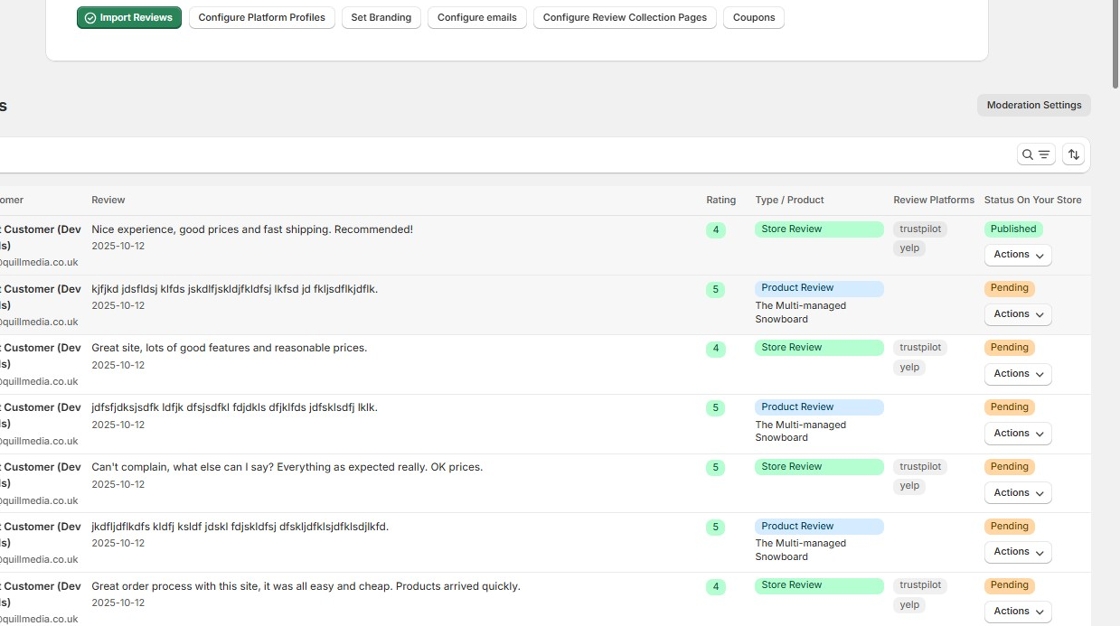
- Select a hiding reason from the dropdown (e.g., "Other (requires explanation)")
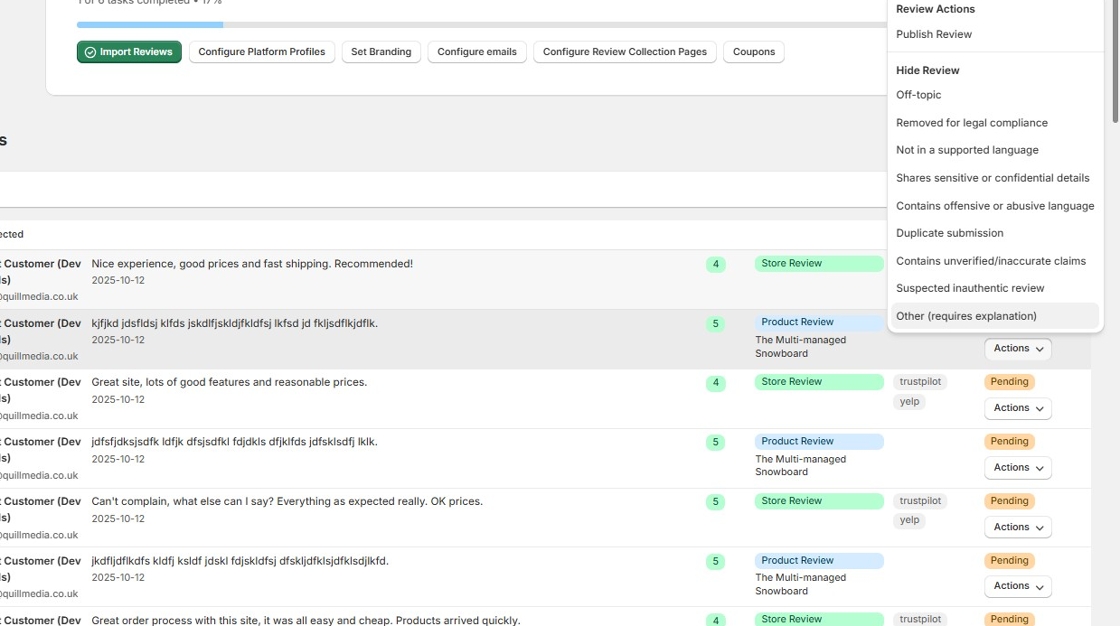
- Click Hide Review to confirm
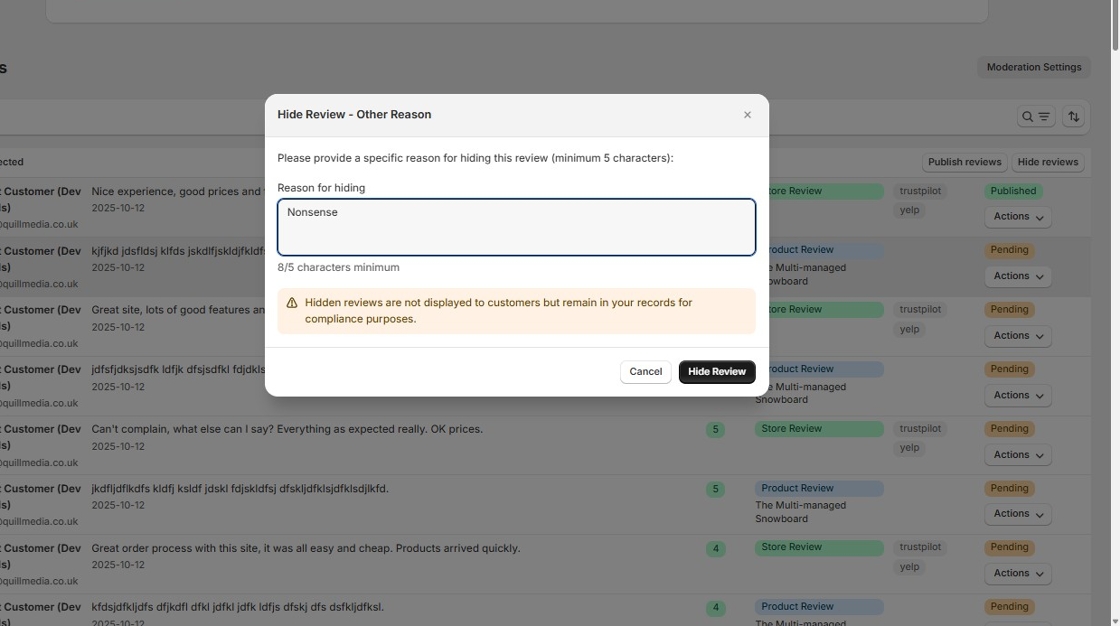
- For "Other," type at least 5 characters explaining why
- Confirm your action
What happens:
- Review is removed from your store display
- Reason is logged for compliance
- Review is retained in your database
- Does not affect your public rating
Important: You must select a valid reason. You cannot hide reviews without cause.
How to Hide Multiple Reviews at Once (Bulk Action)
When to use: You have several reviews that violate the same policy and need to be hidden.
Steps:
- Go to Reviews in the app
- Check the boxes next to each review you want to hide
- Click Hide Selected button that appears at the top
- Select a reason that applies to ALL selected reviews
- Confirm the action
What happens:
- All selected reviews are hidden with the same reason
- The reason is logged for each review for compliance
- All reviews are retained in your database
- None affect your public rating
Important notes:
- The same hiding reason applies to all selected reviews
- Only select reviews that violate the same policy
- Each review must have a valid reason - bulk actions don't bypass this requirement
- You can still access individual reviews later to see the hiding reason
Example use case: If you receive several spam reviews from the same source, you can select them all and hide with "Suspected inauthentic review" reason.
How to Delete an Imported Review
When to use: Only for reviews imported from other platforms that shouldn't be in your system.
Important limitations:
- ❌ Cannot delete native reviews (reviews left directly on your store)
- ✅ Can only delete reviews imported from other platforms
- Use this carefully - it's permanent
Steps:
Individual deletion:
- Verify the review shows "Imported from [Platform]" in the Imported Reviews table
- Click Actions dropdown
- Select Delete
- Confirm deletion
- Review is permanently removed
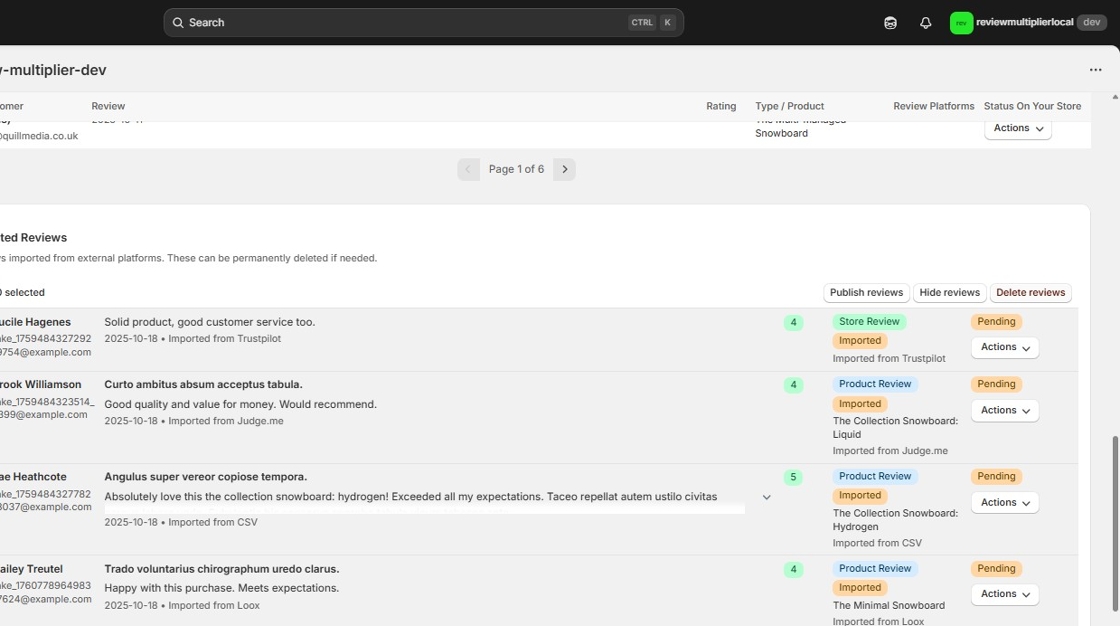
Bulk deletion (for multiple imported reviews):
- Scroll down to the Imported Reviews table on the Reviews page
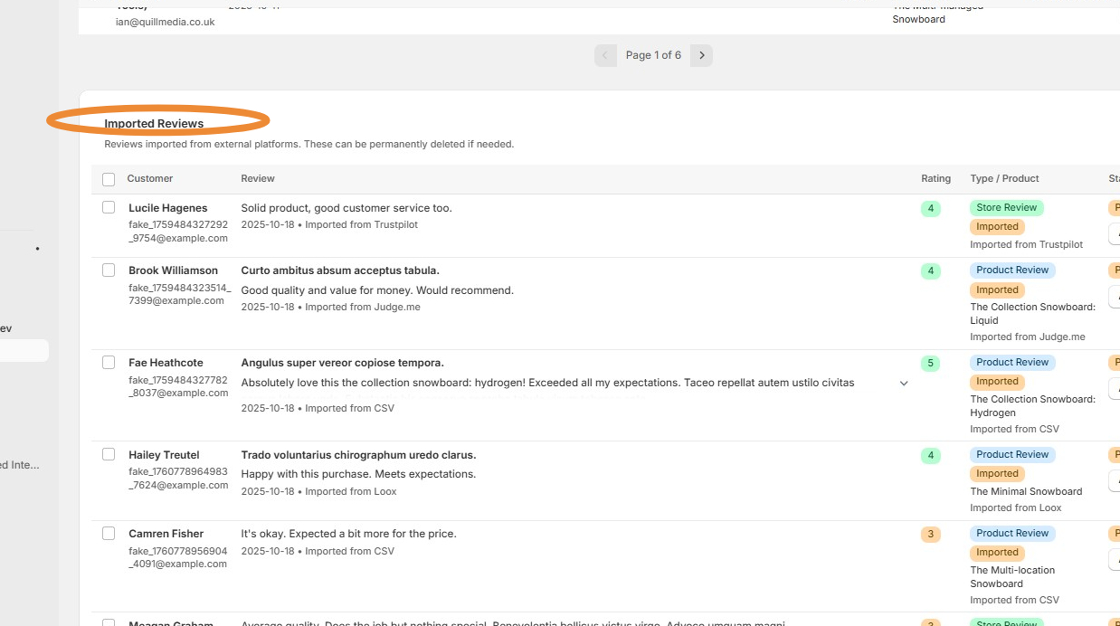
- Check the boxes next to reviews you want to delete (or use "Select all imported reviews")
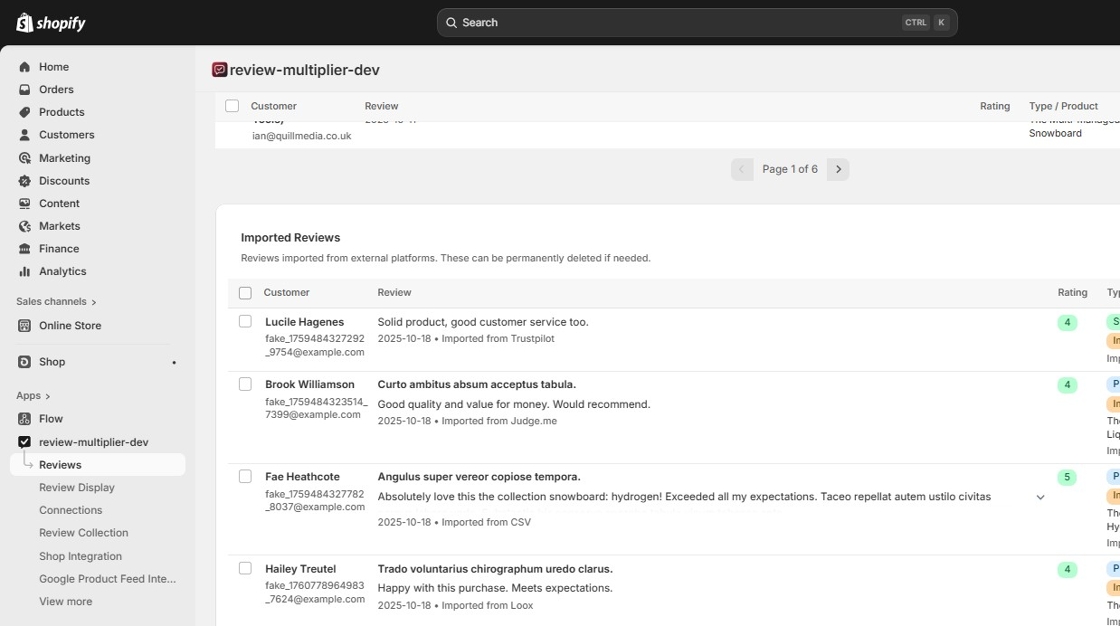
- Click Delete reviews button
- Confirm the deletion in the modal
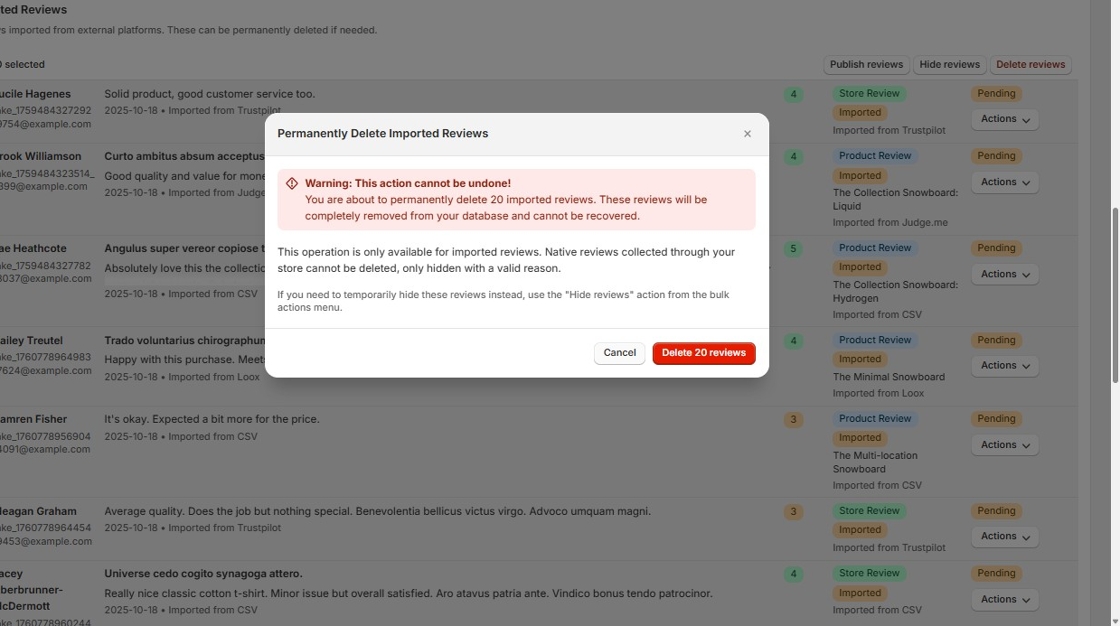
Why this restriction exists: Native reviews (from your store) are customer feedback that should be preserved. Imported reviews might be duplicates or incorrectly imported, so deletion is allowed.
Valid Reasons for Hiding Reviews
You must choose one of these reasons when hiding a review. Here's what each means and when to use it:
1. Off-Topic Content
Use when: The review doesn't relate to your product or service.
Examples:
- Customer reviews your shipping carrier instead of your product
- Review discusses political opinions unrelated to the purchase
- Customer complains about weather affecting delivery (not your control)
- Review is actually about a different company entirely
Don't use for: Reviews mentioning shipping speed (that's part of the experience) or packaging (that's your responsibility).
2. Legal Compliance Issues
Use when: The review violates laws or legal requirements.
Examples:
- Review contains defamatory statements about individuals
- Medical claims that violate FDA regulations
- Copyright infringement (copying text from elsewhere)
- Disclosure of confidential business information
- Violation of GDPR or privacy regulations
Important: This is for actual legal issues, not just negative opinions.
3. Unsupported Language
Use when: The review is in a language you don't support.
Examples:
- Your store is English-only and review is entirely in Chinese
- You don't have translation capabilities for the language
- Language used doesn't match any of your target markets
Don't use for: Reviews with a few foreign words or phrases mixed with your supported language.
Consider instead: Using translation tools to respond, showing you care about all customers.
4. Sensitive Details
Use when: The review contains private or confidential information.
Examples:
- Customer's full credit card number or financial information
- Personal addresses, phone numbers, or email addresses
- Private medical information
- Order numbers or account details that could compromise security
- Employee personal information
Best practice: Contact the customer to let them know and offer to publish an edited version without sensitive details.
5. Offensive Language
Use when: The review contains abusive, vulgar, or highly inappropriate content.
Examples:
- Excessive profanity or vulgar language
- Hate speech or discriminatory language
- Sexual content or harassment
- Threats or violent language
- Abusive attacks on staff members
Don't confuse with: Strong negative opinions expressed professionally. "This product is terrible" is fine. "This #$%@ product" might warrant hiding.
Gray area: Mild profanity in otherwise constructive criticism - consider responding rather than hiding.
6. Duplicate Submission
Use when: The customer submitted the exact same review multiple times.
Examples:
- Same customer, same text, submitted twice on the same day
- Technical glitch caused double submission
- Customer resubmitted thinking the first didn't work
Action required: Hide duplicates, keep the original review published (if it's valid).
Don't use for: Similar reviews from the same customer about different purchases or updated experiences.
7. Unverified Claims
Use when: The review makes false or misleading statements as facts.
Examples:
- Claims product contains ingredients that aren't actually in it
- States product is counterfeit when it's authentic
- Makes verifiably false statements about your business practices
- Accuses you of illegal actions that didn't occur
Important distinction: This is for factually false statements, not subjective opinions. "This didn't work for me" is opinion (keep it). "This contains dangerous chemicals" (when it doesn't) is an unverified claim (can hide).
Better approach: When possible, respond with facts rather than hiding. This shows transparency.
8. Suspected Inauthentic Review
Use when: You have reason to believe the review is fake or fraudulent.
Examples:
- Review from someone who never purchased from you
- Obvious bot-generated text or spam
- Competitor submitting fake negative reviews
- Customer incentivized to leave fake positive review
- Multiple reviews from same IP address with different names
Requires evidence: You should have a good reason to suspect inauthenticity. Don't use this for reviews you simply don't like.
Caution: Use sparingly. Genuine customers sometimes leave reviews that seem suspicious but are real.
9. Other Reason
Use when: The review needs to be hidden but doesn't fit other categories.
Requirements:
- Must type at least 5 characters explaining why
- Should be a legitimate moderation reason
- Will be logged for compliance
Examples of valid "Other" reasons:
- "Contains competitor product names as spam"
- "Review intended for different store"
- "Customer requested review removal"
- "Contains outdated information about recalled product"
Not valid: "I don't like it," "Too negative," "Bad for business" - these aren't legitimate reasons.
Common Moderation Scenarios
Scenario 1: Harsh But Honest Negative Review
The review: "Disappointed with this purchase. Product quality is poor and not as described. Photos made it look much better. Would not recommend."
Rating: 2 stars
What to do: ✅ Publish and respond
Why: This is honest feedback, even if it's negative. The customer isn't being abusive or making false claims.
Your response: "We're sorry this didn't meet your expectations. We'd like to make this right. Please contact us at [email] within 30 days for a return or exchange. We'll also review our product photos to ensure accuracy."
Impact: Shows you listen to criticism and handle issues professionally. This actually builds trust.
Scenario 2: Review with Profanity
The review: "This is complete BS. Product broke after 2 days. Total waste of my f***ing money."
Rating: 1 star
What to do: Consider the severity
Option A - Hide it: If profanity is excessive or offensive
- Reason: Offensive language
- Note: "Contains profanity inappropriate for our store"
Option B - Publish and respond: If it's mild profanity in an otherwise valid complaint
- Response: "We're sorry you had this experience. This isn't typical of our product quality. Please contact us immediately at [email] for a replacement or full refund. We stand behind our products."
Decision factors:
- Your brand standards
- Severity of language
- Whether the underlying complaint is valid
Scenario 3: Suspected Competitor Fake Review
The review: "Terrible company. Buy from [CompetitorName] instead. They're much better and cheaper. Don't waste money here."
Rating: 1 star
What to do: ✅ Hide
Reason: "Suspected inauthentic review"
Why: Appears to be from a competitor (promotes another company) and doesn't describe an actual experience with your product.
Additional action: Check if reviewer made a purchase. If not, this confirms inauthenticity.
Scenario 4: Duplicate Reviews
The situation: Same customer left identical 5-star reviews twice on the same day
The review: "Love this product! Fast shipping and great quality. Highly recommend!"
What to do: Keep one, hide the duplicate
Action:
- Keep the first review published
- Hide the second one
- Reason: Duplicate submission
- Note: "Customer accidentally submitted twice"
Why: One authentic review is valuable. Multiple identical ones look suspicious and clutter your review section.
Scenario 5: Review in Foreign Language
The review: [Entire review in Spanish - your store is English-only]
Rating: 5 stars
What to do: Two options
Option A - Translate and understand it:
- Use translation tools
- If it's positive and legitimate, keep it published
- Respond in the customer's language (use translation tool) to show you care
Option B - Hide if truly unsupported:
- Reason: Unsupported language
- When: Your customers can't read it and you can't verify its content
- Better approach: Consider translation tools first
Best practice: If your customer base includes speakers of this language, consider adding translation features rather than hiding reviews.
Scenario 6: Review About Shipping, Not Product
The review: "Package arrived damaged. Shipping company clearly mishandled this. Product itself seems fine once I got into the box."
Rating: 3 stars
What to do: ✅ Publish and respond
Why: Even though it's mainly about shipping, it impacts the customer experience you provided. This is valid feedback about the full purchasing experience.
Your response: "Thank you for letting us know about the shipping damage. We're glad the product itself is okay! We'll improve our packaging to prevent this. If you notice any damage to the product, please contact us for a replacement."
Don't use: "Off-topic" reason - shipping is part of the customer experience.
Scenario 7: Customer's Personal Information Visible
The review: "Great product! Arrived at my home address 123 Main St, Anytown faster than expected. Order #54321."
Rating: 5 stars
What to do: ✅ Hide temporarily, then republish edited version
Immediate action:
- Hide the review
- Reason: Sensitive details
- Contact customer: "Hi! We noticed your review includes your address and order number. We've temporarily hidden it for your privacy. Would you like us to publish an edited version without this information?"
Follow-up: Once customer approves, manually edit the review (if your system allows) or ask them to resubmit.
Scenario 8: Customer Changed Their Mind
The situation: Customer emails asking you to remove their 3-star review because they figured out the issue was their mistake, not your product.
What to do: Options available
Option A - Hide with permission:
- Reason: Other
- Explanation: "Customer requested removal after resolving issue"
- Keep documentation of their request
Option B - Ask customer to update the review (better):
- They can edit their review to reflect their new understanding
- Original review with update shows authenticity
- "UPDATE: I figured out I was using it wrong. Product is actually great! Changing to 5 stars."
Option C - Keep it published:
- Explain that reviews reflect the customer experience at the time
- Offer to respond to show the resolution
Best practice: Option B - authentic reviews, including mistakes and resolutions, build the most trust.
Scenario 9: Review Makes False Claims
The review: "This product contains lead and is dangerous for children. Should be banned."
Facts: Your product is certified lead-free and meets all safety standards.
What to do: ✅ Hide, but also respond publicly
Action:
- Hide the review
- Reason: Unverified claims
- Explanation: "Product is certified lead-free, false claim about dangerous content"
Also respond publicly (in activity feed or on your site):
- Post about your safety certifications
- Share lab test results
- Address concerns transparently
Why both: Hide the false claim to prevent misinformation, but address it publicly to show transparency.
Legal note: Keep records of your safety certifications in case needed for compliance.
Understanding the 14-Day Auto-Publish Timer
How It Works
When a review is marked "Pending":
- A 14-day countdown begins immediately
- You'll see "Auto-publishes in X days" in the app
- The review can be published or hidden anytime during these 14 days
- If no action is taken, the review publishes automatically on day 14
Why This Matters
For customers: Ensures their feedback is heard, even if you're busy or forget to review it.
For your business:
- Prevents indefinite suppression of reviews
- Keeps you compliant with platform policies
- Maintains trust with customers and review platforms
- Creates accountability in your moderation process
For platforms (Google, Trustpilot, etc.): Shows you're not manipulating reviews.
What Happens When Reviews Auto-Publish
Notification:
- You'll see an activity feed entry
- "X reviews auto-published" message
- List of which reviews went live
The reviews:
- Published to your store immediately
- Included in average rating
- Visible to all customers
- Can still be responded to
What you can do:
- Review the auto-published reviews
- Respond to them if needed
- If one shouldn't have been published (and you have a valid reason), you can still hide it after auto-publish
Staying on Top of the Timer
Best practices:
- Check weekly: Review pending items once per week minimum
- Set reminders: Use your calendar to check every Monday, for example
- Watch the dashboard: The app shows how many reviews are pending
- Prioritize: Reviews with < 7 days remaining need immediate attention
- Enable notifications: Turn on activity feed alerts for pending reviews
Don't stress: Auto-publish is actually good for your credibility. If you're too busy to review every single piece of feedback, the system ensures your customers' voices are still heard.
Monitoring Your Reviews
Where to Check Pending Reviews
In the app:
- Go to Reviews section
- Filter by Status: Pending
- Sort by "Days Remaining" to see urgent ones first
- See countdown for each review
Dashboard widget:
- Shows count of pending reviews
- Quick link to review queue
- Updates in real-time
Activity Feed Notifications
The activity feed shows:
- New reviews that need moderation
- Reviews that were auto-published
- Reviews you've published or hidden
- When reviews are close to auto-publishing (7 days, 3 days, 1 day)
Customize notifications:
- Choose which events to be notified about
- Set email alerts for pending reviews
- Get daily summaries
Moderation Statistics
Your moderation dashboard displays:
Current status:
- X reviews pending (awaiting action)
- Y reviews published (visible on store)
- Z reviews hidden (with reasons)
Trends:
- How many reviews you publish vs. hide
- Most common hiding reasons
- Average time to moderation
Why track this: Patterns help you understand:
- If your threshold setting is appropriate
- Whether you're moderating fairly
- Areas for improvement in products or service
Compliance and Building Trust
Why Fair Moderation Builds Trust
Customers trust stores with mixed reviews more than stores with only 5-star reviews.
Research shows:
- Stores with a 4.2-4.5 average rating get more sales than 5.0
- Mixed reviews appear more authentic
What this means for you:
- Publishing honest 3-4 star reviews actually helps sales
- Responding to negative reviews shows you care
- Hiding reviews should be rare (only for policy violations)
- Authentic feedback builds long-term trust
Platform Compliance
Google's Requirements:
- No suppression of negative reviews
- All reviews must be from real customers
- Reviews cannot be incentivized unfairly
- Moderation reasons must be legitimate
Trustpilot's Standards:
- Reviews must be authentic and unbiased
- Cannot cherry-pick which reviews to display
- Must follow transparent moderation practices
- Audit trail required for all moderation
Review Multiplier helps you comply:
- 14-day auto-publish prevents suppression
- Required reasons for hiding reviews
- Complete audit trail of all actions
- Fair, transparent moderation system
Consumer Protection Laws
FTC Guidelines (United States):
- Reviews must be truthful and not misleading
- Cannot suppress negative reviews selectively
- Must disclose if reviews are incentivized
- Fake reviews are illegal
GDPR (European Union):
- Customer data in reviews must be protected
- Right to be forgotten (customers can request review removal)
- Transparent processing of review data
- Secure storage of reviewer information
Review Multiplier's system:
- Complies with major consumer protection laws
- Provides audit trail for regulatory requests
- Protects customer data
- Allows for legitimate removal requests
Frequently Asked Questions
Can I turn off the moderation system?
No. Moderation is always active to ensure fair practices and platform compliance.
Why: This protects both you and your customers. Without moderation guidelines, stores risk:
- Violating platform policies (Google, Trustpilot, etc.)
- Legal issues with consumer protection agencies
- Loss of customer trust
- Reputation damage
What you can control: Your rating threshold. Set it to 1 star if you want nearly all reviews to auto-publish.
Can I change the 14-day auto-publish period?
No. The 14-day period is fixed and cannot be customized.
Why it's fixed:
- Industry standard for review moderation
- Prevents indefinite suppression of feedback
- Ensures consistent practices across all merchants
- Complies with platform policies
14 days is plenty of time to:
- Review the feedback
- Decide on appropriate action
- Respond to the customer
- Hide if there's a valid reason
Pro tip: Most merchants find 14 days is more than enough. Reviews don't need immediate action - take time to make thoughtful decisions.
What happens to hidden reviews?
Hidden reviews are:
- Retained in your database permanently
- Not visible to customers on your store
- Not included in your average rating calculation
- Not counted in your total review count
- Logged with your hiding reason for compliance
Why keep them:
- Regulatory compliance requirements
- Potential audit trail needs
- In case of customer disputes
- Internal feedback for product improvement
Can customers see them? No. Hidden reviews are only visible to you and your team in the app admin.
Can they be unhidden? Not directly. If you realize you hid a review in error, you would need to contact support. It's better to carefully consider before hiding.
Can I hide reviews after they're published?
Yes, but only with a valid reason from the approved list.
Process:
- Go to the published review
- Click Actions → Hide Review
- Select a valid reason
- Confirm action
When to do this:
- You noticed a policy violation after publishing
- Customer added sensitive information in follow-up
- Review was edited to include offensive content (if editing is enabled)
- You discovered the review is inauthentic
When NOT to do this:
- You changed your mind about a negative review
- Too many low ratings are affecting your average
- Customer complaints are valid but unflattering
Important: This shouldn't be a regular occurrence. If you're frequently hiding published reviews, you may need to adjust your threshold or moderation practices.
Do hidden reviews count toward my average rating?
No. Hidden reviews:
- ❌ Don't affect your displayed star rating
- ❌ Aren't included in total review count
- ❌ Don't appear in review widgets
- ❌ Aren't shared to other platforms (Google, Facebook, etc.)
Example:
- You have 100 published reviews: 4.3 average
- You hide 5 reviews for valid reasons
- Your displayed rating is still based on the 100 published reviews only
- The 5 hidden reviews don't factor into the 4.3 average
Why this matters: You can hide policy-violating reviews without them impacting your rating. But remember - you can't hide reviews just because they're negative.
What if a customer asks me to remove their review?
If the customer requests removal:
Option 1 - Hide with documentation (recommended):
- Get the request in writing (email, chat)
- Hide the review
- Reason: Other
- Explanation: "Customer requested removal on [date]"
- Keep the email/documentation
Option 2 - Explain why it stays published:
- Reviews are part of the authentic feedback system
- Other customers rely on honest opinions
- Offer to help them edit their review instead
- Suggest they update it to reflect any changed circumstances
Legal requirements:
- GDPR (Europe): May be required to remove under "right to be forgotten"
- CCPA (California): Customer data removal rights may apply
- Generally: Customer requests are a valid reason to hide reviews
Best practice: Honor reasonable removal requests when possible. This builds goodwill and shows you respect customer preferences.
Can customers see who moderated their review?
No. Customers cannot see:
- Who reviewed their submission
- When moderation action was taken
- Why a review was published/hidden
- Internal moderation notes
What customers see:
- If their review is published (appears on store)
- If their review is pending (usually notified to wait)
- Their review wasn't published (but not told why in most cases)
Why this privacy:
- Protects your staff from harassment
- Maintains professional boundaries
- Prevents disputes over moderation decisions
- Standard practice across review platforms
How do I handle a review that's both valid and problematic?
Example: "Product is terrible and your customer service is a f***ing joke."
The challenge:
- Valid complaint: Product quality and service issues
- Problematic: Contains profanity
Your options:
Option A - Publish and respond (recommended for mild profanity):
- Shows transparency and accountability
- Allows you to publicly address the concerns
- Demonstrates customer service commitment
- Response: "We're sorry we failed to meet your expectations. Please contact our manager directly at [email] so we can make this right. We're committed to improving our service."
Option B - Hide for offensive language:
- Reason: Offensive language
- Contact customer privately: "We received your feedback and want to address your concerns about [product quality and service]. However, we couldn't publish the review due to language policy. Would you be willing to rephrase so we can share your experience with other customers?"
- Encourage them to resubmit without profanity
Option C - Edit if possible (some systems allow):
- Remove the profanity
- Keep the core complaint
- Note: "Edited for language"
- Publish the edited version
Best practice: Option A when possible. Showing you can handle criticism, even when unflattering, builds trust.
What if I disagree with a review's facts but it's not defamatory?
Example: "Took 3 weeks to arrive" (actually took 10 days)
What you can do:
- ✅ Publish the review
- ✅ Respond with facts: "We show this order shipped on [date] and delivered on [date], 10 days total. We're always working to improve shipping times. Feel free to contact us about any delivery concerns."
- ❌ Don't hide it for "Unverified claims" unless it's clearly false and harmful
Why publish:
- Customer perception is their reality (even if timeline differs)
- Your response shows the facts
- Demonstrates transparency
- Shows you engage with feedback
"Unverified claims" is for:
- Provably false statements
- Malicious misinformation
- Claims of illegal/dangerous activity that didn't occur
"Unverified claims" is NOT for:
- Customer misremembering details
- Different perception of timing
- Subjective quality complaints
Golden rule: When in doubt, publish and respond rather than hide.
How many reviews should I expect to hide?
Typical rates:
- Healthy moderation: 2-5% of reviews hidden
- Too aggressive: 10%+ of reviews hidden
- Red flag: 15%+ of reviews hidden
What the numbers mean:
2-5% hidden: Normal and healthy
- Occasional spam, duplicates, or policy violations
- Most reviews are legitimate and published
- Shows fair moderation practices
10% hidden: Worth reviewing your practices
- Are you being too strict?
- Are your products/services generating legitimate complaints you're hiding?
- Check that all hidden reviews have valid reasons
15%+ hidden: Problematic
- May indicate cherry-picking negative reviews
- Could violate platform policies
- Review your moderation practices
- Consider lowering rating threshold
If most hidden reviews are 1-2 stars:
- You might be suppressing negative feedback
- Consider why customers are unhappy and fix root issues
- Remember: Some negative reviews are okay and actually boost credibility
Can I bulk moderate multiple reviews at once?
Yes! Bulk moderation is now available for both publishing and hiding reviews.
What you can do:
- Bulk publish: Select multiple pending reviews and publish them all at once
- Bulk hide: Select multiple reviews and hide them with the same reason
- Filter reviews by rating, date, or status to find reviews that need similar action
- Apply consistent reasoning to similar cases
How it works:
- Check the boxes next to reviews you want to moderate
- Click "Publish Selected" or "Hide Selected" button
- For hiding, choose a reason that applies to all selected reviews
- Confirm the action
When to use bulk actions:
- Multiple legitimate reviews pending that you want to publish together
- Several spam reviews from the same source to hide
- Duplicate reviews that all need the same action
- Reviews violating the same policy
Important limitations:
- All selected reviews for bulk hiding must use the same reason
- Each review still requires a valid reason - bulk doesn't bypass compliance
- Best used when reviews genuinely share the same characteristics
Why some moderation should still be individual:
- Reviews with different issues need different reasons
- Each review deserves individual consideration for fairness
- Prevents accidental hiding of legitimate feedback
- Maintains compliance with moderation policies
Pro tip: Use filters to group similar reviews (e.g., all 1-star reviews, all from last week) before applying bulk actions.
Need Help with Moderation?
Contact Support
If you're unsure about whether to hide a review or which reason to use:
Email: support@reviewmultiplier.ai Help Center: help.reviewmultiplier.ai
Include in your message:
- The review text (or a summary)
- Why you think it might need hiding
- What action you're considering
- Any relevant context
We're here to help you make fair, policy-compliant moderation decisions.
Additional Resources
Review Moderation Webinar: Monthly training sessions on best practices Policy Updates: We'll notify you of any changes to moderation guidelines Case Studies: Examples of effective review moderation from successful merchants Community Forum: Discuss strategies with other store owners
Last Updated: October 2025 Version: 2.0
This guide reflects Review Multiplier's current moderation system. We may update policies to reflect changing platform requirements or regulatory guidance. Check for updates regularly.
Quick Reference Card
Moderation Decision Tree
New Review Arrives
↓
Is rating ≥ your threshold?
├─ YES → Published automatically ✅
└─ NO → Pending (14-day timer starts) ⏳
    ↓
    Does it violate a policy?
    ├─ YES → Hide with valid reason 🚫
    └─ NO → Publish or wait for auto-publish ✅
When to Hide vs. Publish
| Situation | Action | Reason |
|---|---|---|
| Negative but honest review | ✅ Publish | Valid customer feedback |
| Contains profanity (mild) | ✅ Publish & respond | Shows transparency |
| Contains profanity (severe) | 🚫 Hide | Offensive language |
| Customer complaint about product | ✅ Publish | Legitimate feedback |
| Competitor fake review | 🚫 Hide | Suspected inauthentic |
| Duplicate submission | 🚫 Hide (keep one) | Duplicate submission |
| Contains customer address | 🚫 Hide temporarily | Sensitive details |
| Wrong product/company | 🚫 Hide | Off-topic |
| Customer misremembered facts | ✅ Publish & correct | Respond with facts |
| Contains false claims | 🚫 Hide | Unverified claims |
| About shipping delays | ✅ Publish | Part of experience |
| Foreign language (unsupported) | 🚫 Consider translation first | Unsupported language (last resort) |
Emergency Contacts
- Review disputes: support@reviewmultiplier.ai
- Technical issues: tech-support@reviewmultiplier.ai
- Legal/compliance questions: legal@reviewmultiplier.ai
- Urgent moderation decisions: Live chat in app
Building trust, one review at a time. Fair moderation benefits everyone.